- Key Takeaways
- Instant Book isn’t an “accept everyone” switch. It’s a conditional system; a guest can only book instantly when your calendar, requirements, and advance notice settings all line up.
- You can still control who books instantly. Government ID, a good track record, and a pre-booking message all narrow the pool without turning the feature off entirely.
- Instant Book can improve visibility, mainly through the Instant Book search filter, but Airbnb has never confirmed a fixed ranking boost. Treat the 15-25% numbers you’ll see elsewhere as third-party estimates.
- You get extra penalty-free cancellation rights with Instant Book that request-only hosts don’t get, but the list of valid reasons is narrower than most guides make it sound.
- Your advance notice setting decides same-day bookings more than the Instant Book toggle itself does. “1 day” doesn’t mean what most hosts assume it means.
With the instant booking feature turned on, a guest can book a property instantly without any approval of the host. Guests who don’t want to wait love the instant booking, and it narrows down available properties using the filter option. Though it’s a good option for guests, hosts sometimes become confused or worried because they lose manual control over vetting guests, or fear property damage or rule-breaking.
Also, turning on instant booking decides who can book, how fast they can do it, and how visible you are to guests who filter specifically for instant confirmation. Get the settings around it wrong, and you can end up with a same-day booking.
Here’s the thing most skip: the confusion around Instant Book almost never comes from the feature itself. It comes from the settings sitting underneath it: advance notice, preparation time, guest requirements, that most hosts never touch after their first week.
Shawon and our listing management team at STR Assistance see this constantly when we take over management for a new client. The toggle’s been on for two years. Nobody’s looked at the settings underneath it since the day it was switched on.
Today we will talk about what Instant Book does and doesn’t control, which requirements actually protect you without killing your booking volume, whether it genuinely helps your ranking, and when turning it off is the smarter move for your specific property. Grab whichever section actually answers the question you showed up with; you don’t need to read this one in order.
What Is Instant Book on Airbnb?
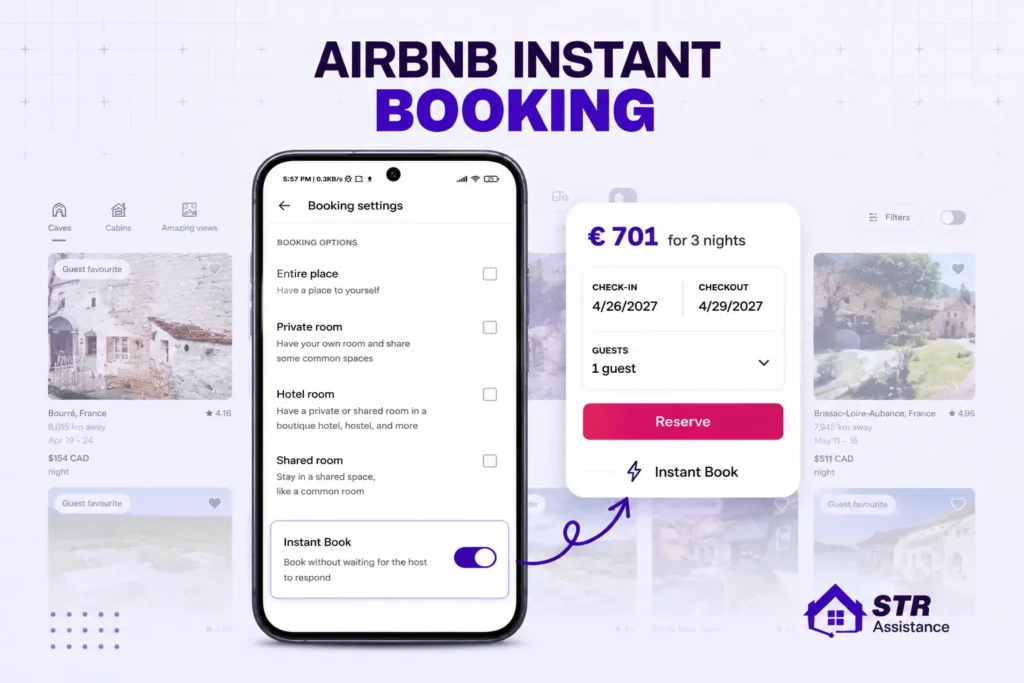
Instant Book is an Airbnb feature where guests can confirm a reservation if the property is available whenever they want without the host manually accepting the request. Hosts turn on the Instant Book option in their Airbnb. For such properties, guests can pick their dates, pay, and lock the booking. Airbnb describes it as a way to make booking faster for guests and easier for hosts.
Airbnb’s Help Center indicates that Instant Book may not be available for a booking less than two days before arrival when the guest’s expected arrival time does not fit the host’s stated check-in window.
Instant Book applies only when the reservation meets the listing’s conditions. It can be unavailable or behave differently when:
- The guest does not meet the host’s requirements.
- The dates violate minimum or maximum stay rules.
- The reservation is too close to check-in.
- The guest’s arrival time falls outside the host’s allowed check-in window.
Without instant booking, hosts manually accept or decline the request. Airbnb built this because waiting is where bookings die. A guest comparing five similar listings tends to book whichever one confirms first, and every hour spent waiting on a host’s approval is an hour that guest might spend booking somewhere else instead. Instant Book exists to close that gap.
How Airbnb Instant Book Works
Instant Book is a pre-booking rules engine. A guest searches your dates, Airbnb checks whether Instant Book applies to that specific search, checks the guest against your requirements, and if everything clears, the guest pays, and the reservation confirms automatically. Airbnb blocks the dates on your calendar and sends you a notification.
The process works in this order:
- The guest selects the property, dates, and number of guests.
- Airbnb checks whether those dates are open.
- Airbnb checks the stay against your minimum-stay, maximum-stay, advance-notice, and check-in rules.
- Airbnb checks whether the guest meets your selected requirements.
- The guest pays through Airbnb.
- The reservation is confirmed automatically.
- The dates are blocked on your Airbnb calendar.
- Your normal confirmation, cleaning, access, and preparation workflow begins.
The host does not receive a normal approval request for a qualifying reservation. The key distinction is that the host sets the rules before booking, while Airbnb applies those rules automatically during the booking process.
What Conditions Must Be Met?
Instant Book is conditional, not unlimited. A guest may be unable to book instantly if:
- The dates are blocked.
- The guest does not meet your requirements.
- The requested stay violates your trip-length settings.
- The reservation does not satisfy your advance-notice setting.
- The guest’s arrival time falls outside your check-in availability.
- The property has restrictions affecting that guest or reservation type.
What Happens After a Booking?
Once an eligible guest completes the reservation:
- The reservation becomes confirmed.
- The dates are blocked on the Airbnb calendar.
- The host receives the booking information.
- The host can communicate with the guest.
- The host must prepare and honor the stay.
- The guest and host can review each other after the trip.
You can still message the guest after the booking confirms, and plenty of hosts do, a quick welcome note, a question about arrival time. But the booking itself is already locked in by that point. You’re not approving it, you’re just saying hello to someone who already has a confirmed reservation.
Instant Booking for Shared Homes Are Different
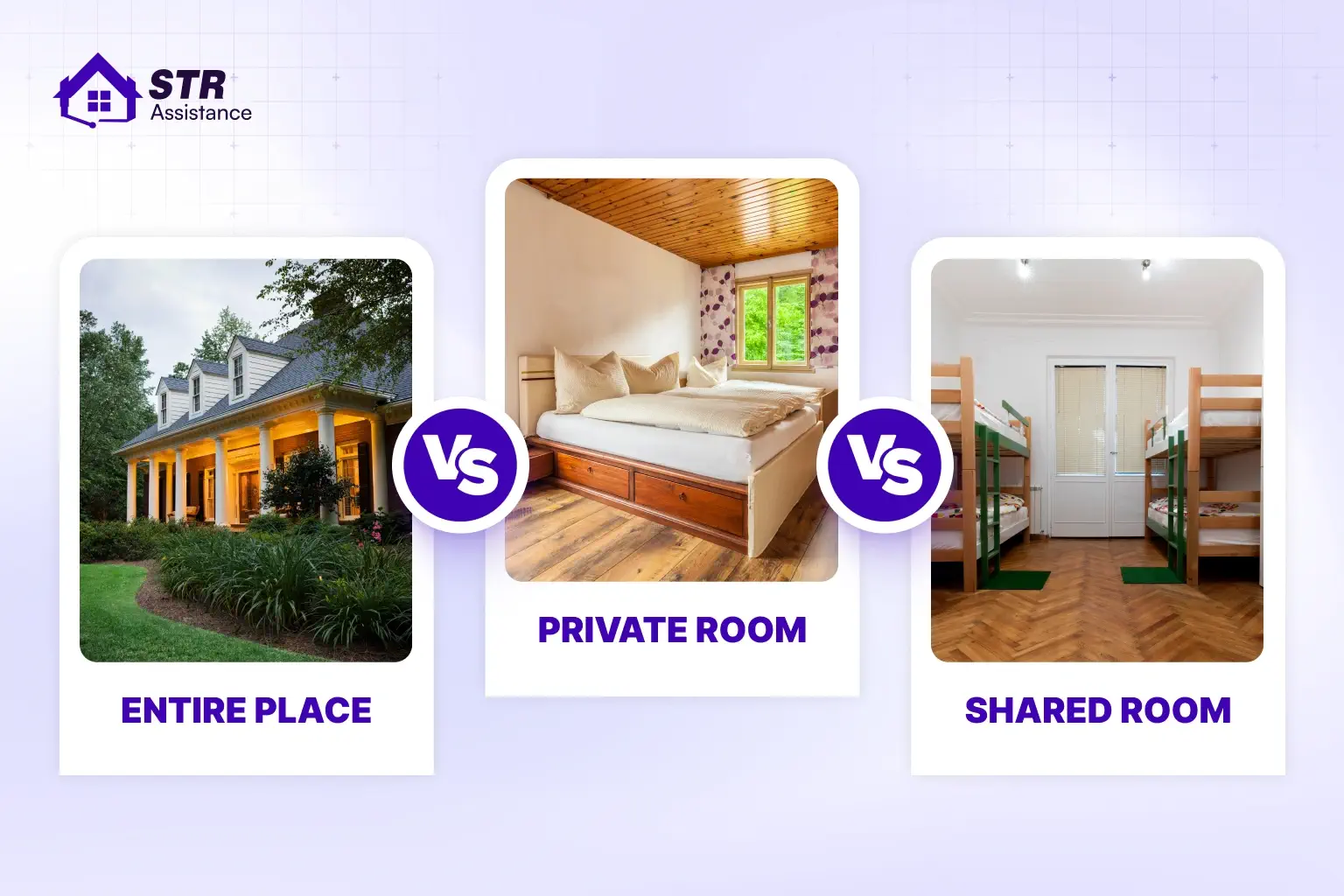
Instant Book has a different risk profile for an entire property than for a room inside the host’s home.
For an entire place, the main risks are usually:
- Calendar accuracy.
- Cleaning.
- Access.
- Maintenance.
- Occupancy.
- Parties or rule violations.
For a shared home, there is an additional compatibility risk. The host may need to live alongside the guest, share facilities, or protect household privacy.
Airbnb may disable Instant Book for homes considered unsuitable for children or infants, requiring a request-to-book process instead. Property characteristics and guest suitability can affect whether immediate booking is available at all.
Airbnb Instant Book Requirements: Controlling Who Can Book
Airbnb’s guest-requirement settings include options such as allowing any Airbnb guest, or requiring an experienced guest with relevant booking history. Airbnb describes experienced guests as those with previous completed reservations and without recent violations of Airbnb policies or host house rules.
This is important because new hosts often assume they must either accept everyone instantly or turn Instant Book off completely.
So, turning Instant Book on doesn’t mean every guest on Airbnb can suddenly book you sight unseen. You get inside your booking settings for each listing to control who qualifies. The requirements section only appears once Instant Book is switched on.
- Government-issued ID: you can require guests to have completed Airbnb’s identity verification. This doesn’t hand you their actual documents; it just means Airbnb has confirmed the guest satisfied that verification step.
- Profile photo: requiring a real, visible profile photo filters out the thinnest, least-established accounts without excluding genuine first-time guests entirely.
- Good track record: Airbnb defines this as a guest who’s completed a previous reservation without incident or a bad review. It’s one of the strongest filters available, though it does exclude first-time Airbnb users along with it.
- Guest trip information: basic details about who’s traveling and why, which helps you catch an obvious mismatch, a group of ten booking a listing built for two, before it becomes your problem.
- Pre-reservation message: a preset question or two guests answer before completing an instant booking, arrival time, trip purpose, confirmation they’ve read your house rules.
What it is proper guests screening is important to prevent any squatter or unwanted situation. At STR Assistance, we screen guests before a booking is accepted, so our host never falls into such a situation.
Guest Requirements Are Filters, Not Guarantees
A good track record or verified-identity requirement can reduce uncertainty, but it is not a guarantee of guest behavior.
A guest may still:
- Ignore house rules.
- Arrive later than expected.
- Misunderstand the listing.
- Bring unregistered visitors.
- Request exceptions.
- Cause damage.
- Communicate poorly.
Airbnb Community discussions also show hosts questioning how much confidence to place in guest reviews and track records. The deeper lesson is that guest requirements reduce some risk but do not replace clear listing descriptions, house rules, and operational preparation.
Benefits of Airbnb Instant Book for Hosts
Instant booking means guests get to book faster and choose those properties that have enabled the feature, and for hosts there is less admin work, and response rates become higher. Also, instant Book can also help you work toward Superhost status by making it easier to maintain the required 90% response rate.
More Bookings From Guests Who Won't Wait for Approval
A guest with fixed travel dates, comparing several similar listings, usually books whoever confirms first. Every hour your listing sits waiting for a manual approval is an hour that guest might spend booking someone else’s place instead, especially when a competing listing next door offers instant confirmation.
But remember instant Book can’t fix a listing with weak photos, an inflated price, or thin reviews.
Better Response Rate, and What It Feeds Into
Because qualifying reservations confirm automatically, you’re not manually accepting or declining every single request that comes in. Fewer requests sitting in your inbox means fewer chances of missing one while you’re asleep, traveling, or just busy running the rest of your life.
But you have to be careful about guest communication after a booking is confirmed; what your guests need, their issues, and everything else. Our guest communication team has a response time of 5 minutes and takes care of every guest’s needs as quickly as possible. Every guest leaves with a five-star rating.
Search Visibility
Instant Book gives you access to a specific demand: guests who filter their search to show only listings they can book immediately. The platform’s ranking algorithm actively favors listings that offer a frictionless booking experience.
Access to Guest Star Ratings
Instant Book reservations go through the exact same review system as any other booking. More completed stays mean more chances to build your overall rating, your review count, and the category scores- cleanliness, communication, accuracy- that guests and Airbnb both weigh heavily.
But be careful about turning on Instant Book without a reliable cleaning and turnover process behind it, and you’re just generating more opportunities for a bad review, not fewer.
Less Admin Per Booking
You’re not reviewing a guest profile, deciding whether to accept, sending an approval message, and waiting for confirmation on every single reservation. For one listing, that saved time is modest. Across five or six units, it adds up to real hours back in your week.
Instant Book removes the approval paperwork, not the actual hosting. You’re still handling check-in instructions, guest questions, cleaning coordination, and anything that comes up mid-stay exactly the way you would with any other booking.
Risks of Airbnb Instant Book (And How to Manage Them)
None of these risks are a reason to avoid Instant Book outright. They’re a reason to pair it with the right settings, so you get the speed without the parts that actually cause problems.
The Calendar Consequence Most Guides Overlook
Instant Book makes the accuracy of your calendar more valuable because it removes the last human checkpoint before confirmation.
If you manually manage Airbnb, Vrbo, a direct-booking website, and personal-use dates, a stale calendar can create a confirmed conflict immediately. With Request to Book, the host might notice the conflict while reviewing the request. With Instant Book, the mistake may already be a reservation.
That is why Instant Book should be activated only after testing:
- New reservations.
- Cancellations.
- Date changes.
- Off-platform bookings.
- Calendar imports.
- Calendar exports.
- Same-day turnarounds.
- Maintenance blocks.
Losing the Pre-Booking Conversation
With a normal request, you get to ask questions before saying yes, is this trip actually a fit, does the guest understand your space. Instant Book skips that entirely for qualifying guests. The fix is building the questions into the process itself: a pre-reservation message that asks trip purpose and guest count directly, so you’re not losing the conversation, just moving it to before the booking instead of during the approval.
Bookings That Break House Rules
A guest can technically qualify for Instant Book and still plan to do something you’d never have approved, bring an undisclosed pet, exceed your guest cap. Clear, specific house rules stated up front, combined with a pre-reservation message asking guests to confirm they’ve read them, catches most of this before it becomes a problem rather than after.
Same-Day and Short-Notice Surprises
Without the right advance notice setting, a guest can book for tonight with zero warning. If your cleaning and prep process can’t turn a property around that fast, this is where Instant Book creates real stress instead of convenience. Setting realistic advance notice, which we walk through in detail further down, is the direct fix here, not turning the whole feature off.
Back-to-Back Bookings With No Turnover Time
Two instant bookings landing back to back can leave you with zero gap for cleaning, inspection, or basic maintenance between guests. Preparation time settings exist specifically to block this, automatically closing off dates that don’t leave enough buffer after a checkout, so your calendar protects your turnover process instead of assuming you’ll figure it out.
Party Risk
A group booking through Instant Book without you ever reviewing the guest count or trip purpose is a real risk, especially around weekends and holidays. A good track record requirement, a clear guest-count cap, and a strict no-party policy stated directly in your house rules together do most of the heavy lifting here.
The Split Between Entire-Place Hosts and Hosts Who Share Their Space
Every one of these risks matters more if you’re sharing your actual home with the guest. An entire-place host dealing with a bad-fit guest has an unpleasant booking. A host sharing a home with that same guest is sharing a kitchen, a hallway, sometimes a bathroom with them. If you host in your own home, lean harder on every requirement available, and don’t feel obligated to run Instant Book the same way an entire-place host down the street does.
Does Instant Book Improve Your Airbnb Search Ranking?
Yes, Airbnb says Instant Book can help a listing stand out and improve its placement in search. Airbnb has never published a fixed number attached to that improvement, so anyone telling you it’s worth an exact percentage is guessing, not quoting Airbnb. You’ll see specific numbers floating around, claims that Instant Book listings rank 15 to 25% higher, or get up to 20% more visibility.
How the Algorithm Rewards Instant Book
- Direct algorithmic boost: Airbnb prioritizes frictionless listings in standard search results to match hotel-like convenience.
- Filter eligibility: Many users toggle the Instant Book filter on; disabled properties are entirely hidden from these searches.
- Higher conversion rates: Removing the wait time for host approval stops users from bouncing to competing listings, signaling high booking velocity to the algorithm.
Turning Instant Book off doesn’t erase you from Airbnb search entirely. You can still appear in a normal, unfiltered search based on your dates, price, location, and everything else that goes into ranking.
Operational & Metric Benefits
- Perfect response metrics: Instant Book automatically handles inquiries, keeping your response rate high without manual effort.
- Superhost qualification: Maintaining top-tier response metrics through the feature helps clear the criteria needed for Superhost status, which carries its own visibility perks.
- Safe control settings: You can restrict instant bookers to experienced guests who have positive reviews from other hosts and verified IDs.
If you want the fuller picture of everything else that goes into where you land in search, our full guide to how Airbnb’s search algorithm ranks listings covers conversion rate, response speed, and every other factor working alongside Instant Book, not just this one piece of it.
Airbnb Instant Book Cancellation Policy: When You Can Cancel Penalty-Free
Instant Book hosts get access to cancellation reasons that request-only hosts simply don’t have, because a request-only host can just decline a bad-fit booking before it’s ever confirmed. Instant Book skips that step, so Airbnb built in a specific, narrower safety net for the situations that step would normally catch.
Airbnb’s actual valid reasons are more general than a lot of guides make them sound, and it’s worth knowing the real list rather than a version that’s been stretched to look more specific than it is. Here’s what actually qualifies, straight from Airbnb’s own policy.
- Circumstances beyond your control: major property damage or an emergency repair situation, a gas leak or a burst pipe, that genuinely makes hosting impossible.
- Serious personal illness: something that actually prevents you from hosting, not general inconvenience.
- Proof the guest intends to break your house rules: or throw an unauthorized party, or otherwise violate Airbnb’s Party and Events Policy.
- A major disruptive event: a declared public health emergency or government travel restriction, the kind of thing well outside anyone’s control.
On top of those general reasons, Instant Book specifically adds two more valid grounds for a penalty-free cancellation. The guest makes it clear they’ll likely break a house rule, mentioning a pet when your listing doesn’t allow one, or smoking when it’s prohibited. Or the guest has several unfavorable reviews or a genuinely thin profile that gives you real, specific concern, not just a vague bad feeling.
How You Can Cancel Penalty-Free
What “uncomfortable with a reservation” actually means in practice is narrower than hosts hope. A gut feeling with nothing behind it generally isn’t enough on its own. Specific, documentable concerns, a pattern of bad reviews, a guest openly saying something that conflicts with your house rules, are what actually qualify.
You may need to submit documentation to get the fees waived, photos or video for property damage, or doctor’s note for a serious illness.
And there’s a real limit on how often you can lean on this: cancel too many Instant Book reservations, even for valid reasons, and Airbnb can require you to turn the feature off entirely. This isn’t a tool for changing your mind repeatedly, it’s a safety net for genuine problems.
What doesn’t qualify matters just as much as what does. An out-of-date calendar that led to a double booking isn’t a valid reason, that’s treated as a host error, not a circumstance beyond your control. Incorrect pricing you regret after the fact isn’t a valid reason either. Both of those come with the standard cancellation fees and consequences attached, exactly the outcome the whole cancellation policy exists to protect guests from.
How to Turn Instant Booking On or Off
You can easily turn instant booking on or off from the Airbnb listing settings dashboard. Airbnb Help Center states the process clearly; here is how you can do it easily.
How to Turn On Instant Booking on Airbnb

Under the listing editor, there is an Instant Book switch on/off option, that you can turn on easily.
- Go to Listings and click the specific listing you want to change.
- Open Booking settings, which sits inside the listing editor.
- Select Use Instant Book (sometimes shown as simply switching Instant Book on, depending on which version of the editor you’re in).
- Choose your guest requirements if you want any, ID verification, good track record, a pre-reservation message.
- Click Save, and the setting applies right away.
Set advance notice and preparation time
To avoid last-minute reservations, you can set your preferred advance notice and preparation time between bookings.
- At least 1 day
- At least 2 days
- At least 3 days
- At least 7 days
How to Turn Off Instant Booking on Airbnb
Same path, reversed. Go to Listings, open the listing, click into Booking settings, and switch to Approve All Bookings instead of Instant Book. Save, and you’re back to reviewing every request manually going forward.
Turning it off doesn’t touch any reservation that already confirmed while it was on. Those stays go ahead exactly as booked; the change only affects bookings from that point forward.
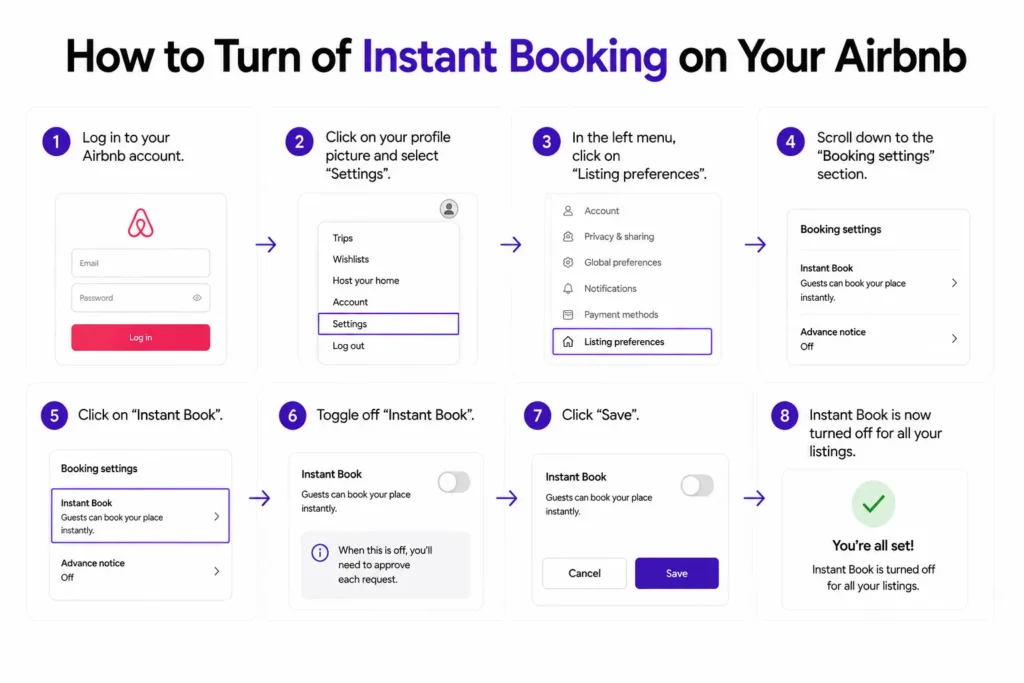
How to Change Your Instant Book Settings Without Turning It Off
You don’t have to choose between fully on and fully off. Inside Booking settings, with Instant Book still active, you can adjust guest requirements, advance notice, and preparation time independently, tightening or loosening the feature without losing the speed it gives you entirely.
The mobile app follows the same general path: Listings, then the specific property, then Booking settings, though the exact menu labels can shift slightly between app versions. If you can’t find a setting exactly where these steps describe, the desktop dashboard tends to be the more reliable reference point, since it updates first and the app sometimes lags a version behind.
Should You Use Airbnb Instant Book?
There’s no single right answer here, and anyone telling you there is hasn’t actually managed a portfolio of different property types. It genuinely depends on how much pre-booking control you need, how reliable your calendar already is, and whether your operation can handle a booking with zero warning.
A Useful Decision Model
You can evaluate Instant Book using this formula:
Net value = additional bookings + admin time saved − bad-fit booking cost − calendar error risk
For an entire place with reliable cleaners, accurate pricing, and strong calendar synchronization, the first two values may dominate.
For a shared home, unstable calendar, or property with strict screening needs, the last two may be more significant.
If You List an Entire Place and Live Elsewhere
Usually yes, as long as your systems are solid. An entire property you don’t personally occupy carries far less personal-safety and privacy weight than a shared home, and Instant Book tends to work well here when your calendar is accurate everywhere it’s listed, your cleaner is dependable, and your access system, a smart lock or a lockbox, doesn’t depend on you being physically present.
If You Host in Your Own Home or Share Space With Guests
Use more caution, and lean toward Request to Book if your comfort level isn’t already high. You’re not just booking out a bed; you’re sharing a kitchen, a hallway, sometimes a bathroom with a stranger, and Instant Book removes your ability to screen for fit specifically, not just for basic identity or eligibility.
If You Are a Brand-New Host
Instant Book can help a brand-new listing pick up its first bookings and reviews faster. New hosts can choose “Approve your first 5 bookings,” which starts you off manually reviewing requests the old-fashioned way, then automatically switches you over to Instant Book once those first five are behind you. It’s a genuinely useful setting most guides on this topic don’t even mention, and it solves the new-host dilemma better than a flat yes-or-no ever could.
If Your Calendar or Pricing Is Not Consistently Up to Date
Don’t turn it on yet. This is the clearest “wait” situation in this entire guide. Instant Book makes bookings happen instantly, which means a stale calendar doesn’t stay a small administrative headache, it becomes a confirmed double booking before you’ve even noticed the conflict. Fix the calendar first. The feature will still be there once you have.
If You Are Getting Bookings but the Wrong Kind
Don’t assume Instant Book is the problem before you’ve actually diagnosed it. “Wrong kind of booking” usually traces back to your listing itself, a title or price attracting the wrong guest type, a minimum stay that’s too short, house rules that aren’t specific enough. If you’d rather have someone else diagnose and manage this shift for you, our co-host services cover exactly this kind of ongoing adjustment.
Instant Book, Advance Notice, and Last-Minute Bookings
This is the setting that actually decides whether you’re getting same-day bookings, far more than the Instant Book toggle itself does. Most hosts never touch it after their first week, which is exactly why same-day surprises keep happening to hosts who were sure they’d set things up carefully.
Can You Book an Airbnb Same Day?
Yes, if the host’s advance notice setting allows it. Airbnb offers a same-day option with a specific cutoff time built in, so a host can accept last-minute bookings up until, say, 3pm the same day, while still blocking anything after that point when there’s no realistic way to prep the property in time.
How Advance Notice Settings Work
Airbnb gives you five real options here: same day with a cutoff time, at least 1 day, at least 2 days, at least 3 days, or at least 7 days. Whichever you pick, Airbnb automatically blocks the corresponding window on your calendar so a guest can’t book inside it.
Why "1 Day Advance Notice" Does Not Mean 24 Hours
This trips up more hosts than almost any other setting on this list. “At least 1 day” doesn’t count backward 24 hours from a guest’s arrival time, it works off the calendar date. A guest booking late in the evening for the following day can still slide through under a “1 day” setting, even though less than 24 actual hours separates the booking from the check-in. If you need a genuine full day of buffer, the setting alone isn’t precise enough on its own to guarantee it.
The Setting That Still Lets Guests Send Last-Minute Requests
Even with longer advance notice requirements in place, a guest can still send you a regular reservation request outside your Instant Book window, they just can’t confirm it instantly. Airbnb specifically notes that a booking within two days of check-in, where the guest’s arrival time falls outside your check-in window, becomes a request instead of an instant booking automatically. You still get to decide on that one manually, which is a genuine safety valve worth knowing exists.
Airbnb's Own Last-Minute Booking Restrictions
Airbnb builds in its own guardrails around near-date bookings independent of whatever you’ve personally set. Reservations landing within 48 hours of check-in get extra scrutiny in how they’re processed, and the two-day, outside-check-in-window rule above kicks in specifically to stop instant confirmations from happening in scenarios that would obviously be too tight to prep for.
Should You Accept Last-Minute Bookings?
Only if your operation can genuinely deliver on them. A same-day booking is a real revenue opportunity; orphan nights and last-minute demand are exactly what Instant Book is best at capturing, but only if your cleaning team can turn a property fast, your access system doesn’t need you standing there in person, and your pricing already reflects the premium a guest expects to pay for that kind of certainty on short notice.
How We Help Hosts Manage Instant Book and Booking Settings
We are a short-term rental virtual assistant company that works with hosts, and so far, we have managed over 800 properties at STR Assistance.
Some of the hosts we take on already have Instant Book switched on. What they don’t have, almost every time, is a set of requirements and advance notice settings that actually match how their property really operates day to day.
We picked up a client last year running three units, Instant Book on across all three, no guest requirements set at all, and a same-day advance notice window even though their cleaner needed a full day to turn a unit around properly. They’d had two back-to-back same-day bookings collide within a single month, no time to clean between them, and both guests left reviews mentioning it. Our listing management team set up the requirements properly for the instant booking and fixed the issue.
Our Airbnb virtual assistants handle the rest of the work, handling your guests, cleaner turnover, and property management. If you don’t want to be someone checking these settings once and forgetting them for two years, contact us.
Frequently Asked Questions
Yes, if the host allows one-night stays in their minimum-stay settings.
No. Standard Airbnb reservations are based on overnight stays, not hourly bookings.
Not directly. It may indirectly help with metrics such as response rate and completed stays.
Yes. Instant Book can be configured separately for each listing.
Yes. Frequent declines can negatively affect your hosting performance metrics.
Yes. Guests can message you first, but eligible guests can also book without waiting for a response.
No. It may affect visibility and booking patterns over time, but it doesn’t cause an immediate ranking drop.
Not automatically. You can manually adjust your settings and advance notice for different seasons.