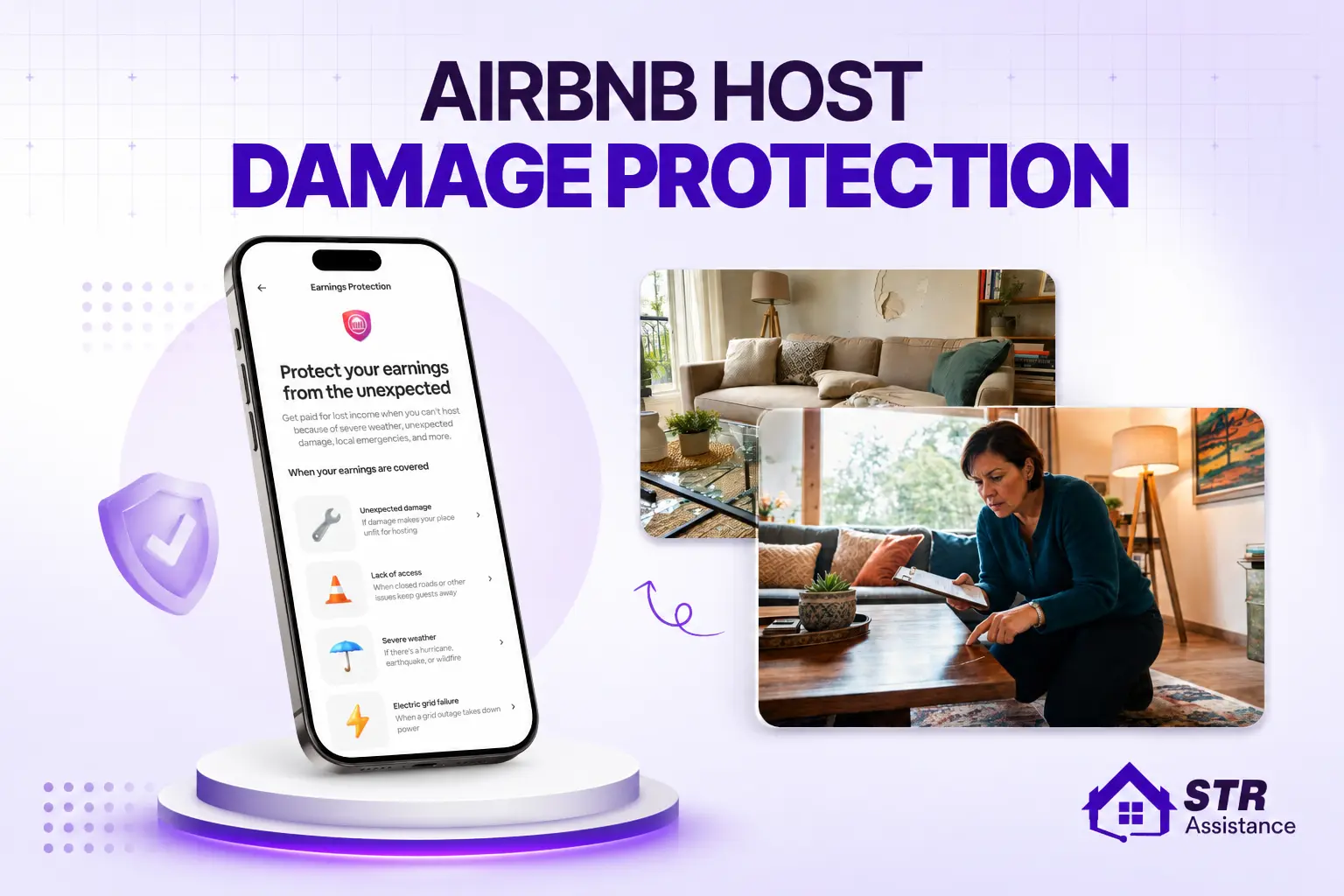
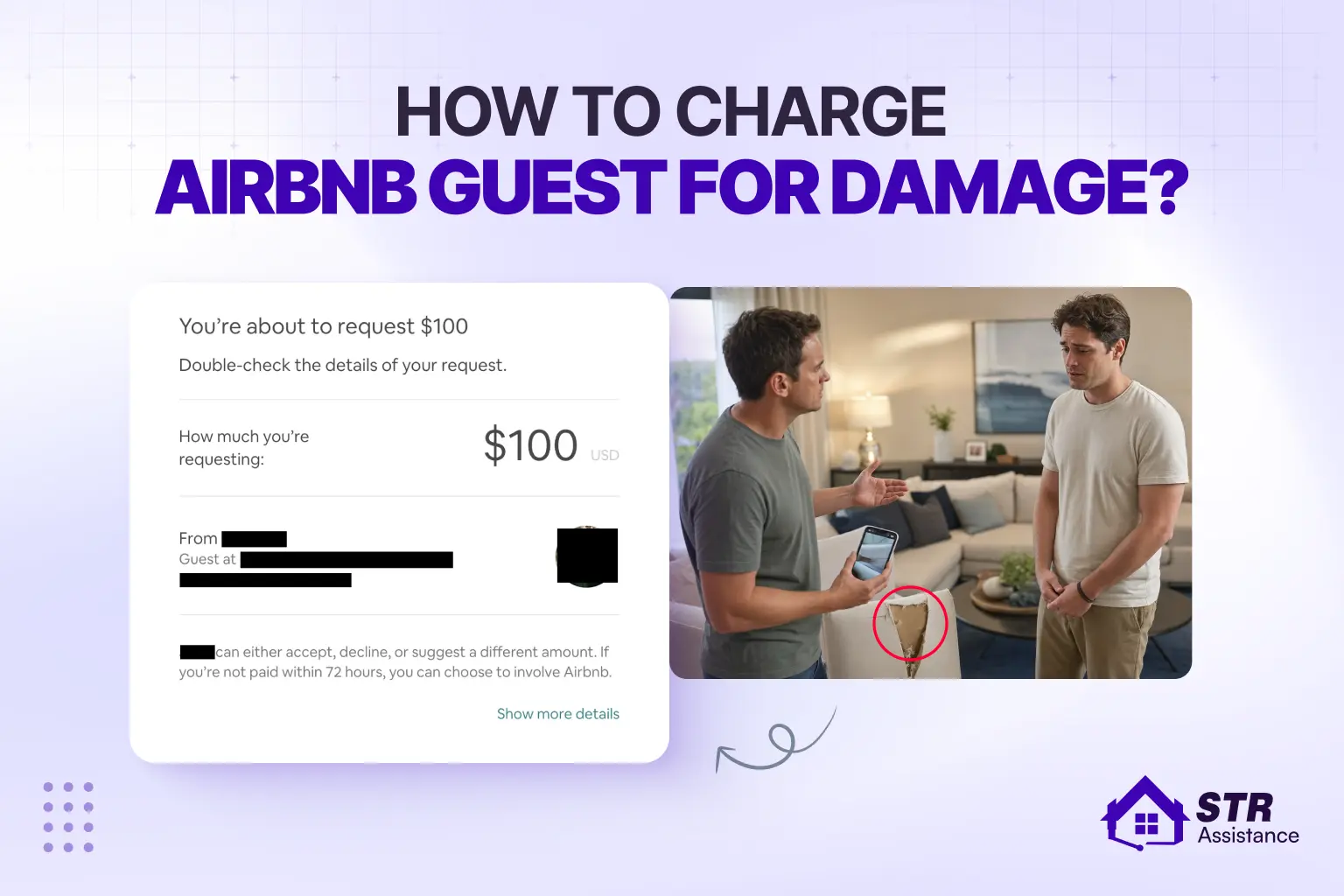
Airbnb dispute management is the process of handling disagreements with guests over refunds, damages, cleaning, cancellations, or false reviews. Every host faces disputes eventually, and how you handle the first hour after finding a problem often decides whether you recover the cost or absorb it yourself.
Hi, I’m Nujhat, Head of Operations at STR Assistance and our disputes management specialist. I have personally handled 300+ Airbnb disputes and damage claim cases for hosts, with a 98% approval success rate.
You may get conflicts with your guests regarding refunds, last-minute cancellations, stealing any items from your property, and many more.
Today, I will share my experience on dispute management, which is one of the common pain points of most hosts. Also, what actually gets a claim approved, where hosts lose otherwise-strong cases, and exactly what changed when Airbnb overhauled its dispute rules in April 2026.
What Is Airbnb Dispute Management?
Airbnb dispute management is the process of handling problems or disagreements between hosts and guests during or after a booking. This usually happens through the Airbnb Resolution Center. It helps solve issues like property damage, refund requests, or extra charges. The process starts with the host and guest trying to work things out by messaging each other. If they can’t agree, Airbnb’s support team can step in to help find a fair solution.
Airbnb’s case managers review the evidence you and your guest provide. They check the Terms of Service and listing policies and then make a final decision. That decision could mean issuing a refund, offering compensation through AirCover, or dismissing the claim.
Why does Airbnb dispute management matter?
- Protects your reputation as a host.
- Helps you avoid negative reviews or retaliatory comments.
- Recovers the actual cost of damage rather than absorbing it.
- Keeps your Superhost and Guest Favorites eligibility intact.
- Improves guest communication, and a well-handled complainant sometimes becomes a repeat guest.
- Signals to Airbnb that you are an active, responsible host, which matters for account standing.
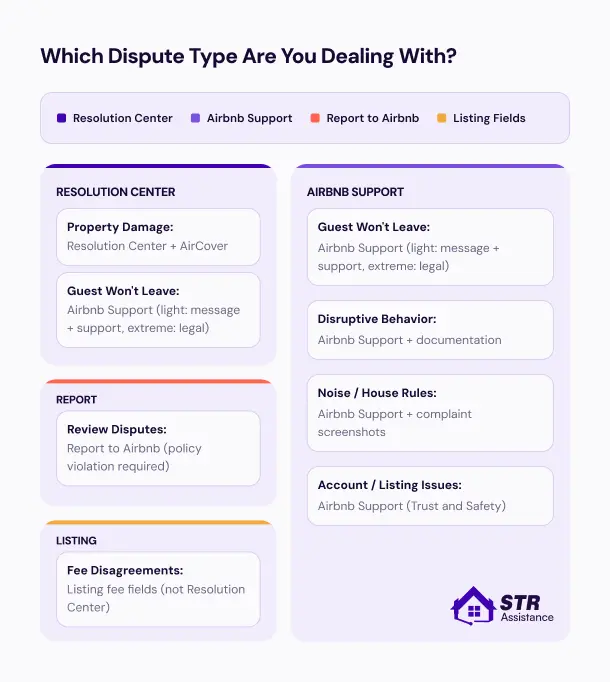
What are the Common Airbnb Disputes hosts face?
Common disputes Airbnb hosts face include guest damage, unauthorized guests, and late check-outs. Some hosts also experience difficulties with property damage, theft, and communication issues. More issues as a host you may face are,
- Guest damage claims
- Cleaning complaints
- Missing or broken items
- Unjustified refund requests
- Security deposit and reimbursement issues
- Guest complaints about noise or amenities
- Review and rating disagreements
- Cancellation disputes
- False or retaliatory reviews
Each of these has its own resolution path, and the right response depends on the situation. Our guide on how to charge an Airbnb guest for damage walks through the Resolution Center filing process for damage claims step by step.
Airbnb’s Resolution Center: How It Works
The Airbnb Resolution Center is an online platform that helps hosts and guests resolve booking-related disputes. You can request compensation for property damage, extra charges, refund requests, payment disputes, and other eligible issues.
The Resolution Center helps protect hosts and guests from unexpected problems and financial losses.
You can do this within 60 days after the guest checks out. Just pick the right reservation, explain what happened, and enter how much money you’re asking for. Airbnb will notify the guest, and they’ll have 72 hours to respond. If the guest accepts, you will get the funds directly.
Note: The Resolution Center doesn’t work for some hotel stays. In such cases, hosts need to solve the issue directly with the hotel.
The process is structured. Both sides can submit evidence and explain what happened. Airbnb recommends resolving the issue through messages first. If you cannot reach an agreement, you can open a formal claim.
Two different windows apply:
- Damage claims: you have 14 days from checkout or before the next guest checks in, whichever comes first.
- Other monetary disputes (non-damage refunds, extra charges, cancellation-related issues): You have 60 days from the reservation’s end date.
Steps: How the Airbnb Resolution Process Works
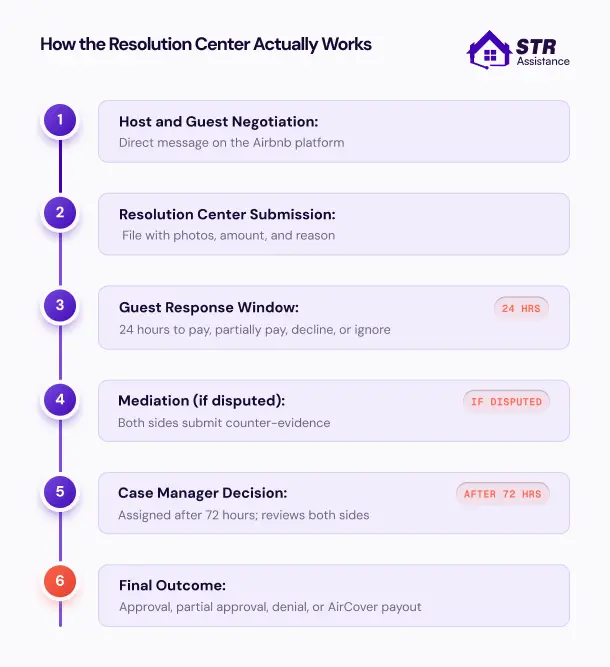
Every dispute follows the same basic path. Knowing each step helps you respond on time and avoid unnecessary delays. Missing a deadline can affect the outcome.
- You open a Resolution Center request from the reservation.
- The guest is notified and has 72 hours to respond. They can pay, dispute, or ignore.
- If they dispute or ignore, you can escalate. Airbnb may offer voluntary mediation first or move directly to case manager review.
- If mediation is offered, you have 1 hour to respond to the invitation.
- A case manager reviews the evidence from both sides, references the Terms of Service, and issues a decision.
Note that the Resolution Center is not the same as AirCover. The Resolution Center is where money moves between you and the guest. AirCover is Airbnb’s separate host protection program that kicks in when the guest refuses to pay. Learn more about how Airbnb host damage protection covers you when a guest refuses.
Airbnb Dispute Management: What Changed in April 2026
Airbnb’s April 20, 2026, Terms of Service update was the biggest dispute-related policy shift in years. Every host handling claims now works under new rules. The terms changed the evidence standard, banned AI-generated photos, tightened several claim categories, and confirmed the $500 direct-charge cap.
If you’ve been hosting for a while and haven’t read the updated terms, this section matters. A few of these changes directly affect how claims get approved or denied.
- AI-generated and AI-enhanced photos are now banned: original, unaltered camera files only. This followed a $16,000 fraud case where AI-generated photos were submitted. Even basic brightness enhancement through an AI tool can trigger rejection, since case managers check file metadata.
- Verifiable evidence now has a formal definition: Evidence must be true, accurate, and not doctored in any way, including by AI, with proof that the guest directly caused the damage.
- Linen stain rules tightened: The 2026 terms now clarify that stains from registered, authorized guests are not eligible for damage claims. Only stains from unauthorized guests or pets violating house rules qualify.
- Smoke odor requires professional remediation: a generic cleaning invoice doesn’t qualify anymore. You need photos, professional assessments, smoke detector readings, or guest admissions, plus a receipt from a qualified remediation service.
- Consumables formally excluded: Section 15.9 of the updated terms now explicitly lists batteries, lightbulbs, toiletries, and cleaning supplies as items guests are expected to use and which cannot be claimed.
- Reasonable care obligation: Section 2.6 now states that hosts must take reasonable care to prevent damage. Repeat claims for the same damage type in the same unit can affect claim eligibility.
- $500 direct charge cap confirmed: Airbnb’s own terms confirm the automatic charge from a guest’s payment method is capped at $500 USD. Amounts above that are pursued separately, including possible referral to a debt collection agency.
- Arbitration moved back to AAA: The primary US arbitration provider changed back to the American Arbitration Association (AAA), with a mandatory 30-day pre-dispute notice before arbitration can be initiated.
- Consumables now have a formal definition: Toiletries, coffee, cleaning supplies, and similar single-use items are formally excluded from damage claims. If a guest finishes the shampoo, that is not a billable item.
- Reasonable care is now expected: Hosts are formally expected to take reasonable steps to prevent damage: clear house rules, working smoke detectors, functioning locks, and proper appliance instructions. If Airbnb determines you did not exercise reasonable care, that weighs against a claim even when the evidence itself is strong.
Disputes at Different Stages of the Guest Stay
Disputes between Airbnb hosts and guests can arise at any point during the reservation, before check-in, during the stay, or after checkout. Each stage has its own common challenges and recommended resolution strategies:
Before Guests Arrive
Most pre-arrival disputes involve cancellations, reservation changes, payment questions, or house rules. Reply quickly and keep every conversation on Airbnb. Confirm any changes through the platform. Clear communication prevents bigger problems later.
Incorrect booking details
Sometimes, guests enter the wrong dates or number of guests during booking. Thus, it will create a confusing pricing issue.
The best way to prevent this Airbnb issue is to double-check the reservation as soon as it’s confirmed. Reach out to your guests and confirm the check-in/check-out dates, number of guests, and any special requests.
To avoid confusion later:
- Message your guests soon after they book to confirm key details
- Politely clarify any mismatched information
- If the guest made a mistake, suggest they modify the reservation or cancel within the free window
Payment issues
It can happen that a guest’s booking goes through, but the payment hasn’t cleared on Airbnb’s side. Whether it’s a technical glitch or a declined card, you and your guest will be in trouble, creating confusion.
To avoid this payment-related Airbnb conflict, wait until Airbnb confirms the booking. It should show it as “paid” before making any promises or sending check-in instructions.
Here’s what you can do:
- Do not offer early access or prepare the space until payment is confirmed
- If guests reach out asking why they haven’t received check-in info, remind them that payment must be processed first
- Refer them to Airbnb support if there’s a system error
Cancellation policy confusion
What if your guests don’t read the cancellation policy before booking? Then they expect a full refund even when it doesn’t apply. This often turns into a dispute when plans change.
To prevent this common Airbnb misunderstanding, highlight your cancellation policy clearly in your messages or house rules.
Here’s how to handle it:
- ently remind guests of the cancellation policy they agreed to
- Refrain from issuing refunds outside Airbnb’s rules
- Recommend that guests contact Airbnb support if they feel there’s an exception
Misleading property photos or descriptions
Sometimes, guests feel the place doesn’t look like what they saw online. Even if you didn’t intend to mislead, you may use a high-resolution camera or even poorly lit photos. So it does not match with real-life property.
To avoid this type of Airbnb dispute, be as transparent as possible in your listing:
- Use recent, high-quality photos that reflect your space accurately
- Clearly mention the layout, size, amenities, and any quirks (like street noise or steep stairs)
- Avoid using wide-angle lenses or overediting images
Host unresponsiveness
When the host does not respond quickly, guests start getting nervous, especially right before check-in. This kind of behavior can lead to more complaints or even cancellation.
If you cannot maintain fast response times personally, our Airbnb guest communication services handle this end-to-end.
Here’s what helps:
- Use auto-replies for FAQs or set up scheduled messages
- Make sure your app notifications are on
- Let them know if you’ll be unavailable for a short time
Early check-in denial
Some of your guests may want to check in early. Whether it’s the case, chances are it’s not a good fit for you. The best way to nip this Airbnb conflict in the bud is to address it in your listing description.
To avoid early check-ins on Airbnb, make it very clear in your listing what time slots you allow and whether early access is possible. Inform your guests that:
- You cannot accommodate early check-ins due to cleaning schedules
- Or it’s only possible if the space is ready, and there might be an extra fee
- If you already mentioned this in your Airbnb listing, but the guest is unaware, politely decline the request
Lack of confirmation or communication
Sometimes, guests worry if they haven’t received check-in instructions close to arrival. If communication is vague or missing, they can become frustrated or create last-minute support tickets.
To prevent this issue:
- Schedule your check-in message to go out at least 24 hours in advance
- Include clear instructions, Wi-Fi info, and any self-check-in codes
- Let them know you’re available if they need anything
Pricing discrepancies
Guests may notice a different total amount on their receipt than what they saw while browsing. Whether it’s service fees, taxes, or weekend rate changes, pricing disputes can pop up before check-in.
To prevent confusion or complaints:
- Explain in your listing that nightly rates may vary by season or day
- Mention that Airbnb adds service fees and taxes automatically
- If a guest asks about the final price, remind them that the platform generates it
- Direct them to Airbnb support for a full breakdown if needed
During the Guest’s Stay
During the guests’ stay, hosts may face several disputes, such as a broken appliance or a noisy neighborhood. You need to prevent them cleverly. Here are some common ones,
Cleanliness issues
Sometimes, guests walk in and feel the space isn’t clean enough. Whether it’s dust, hair in the bathroom, or a missed trash can, these cleanliness complaints are common during a stay.
To prevent bad reviews or refunds:
- Share cleaning checklists with your team
- Ask your cleaner to send photos once the place is ready
- If a guest complains, respond quickly and offer to send someone to fix the issue
Broken amenities or appliances
If there are broken amenities and guests find out the coffee maker doesn’t work or the AC is broken. Even though it was listed as an amenity. This can quickly lead to disappointment.
Here’s what helps:
- Mention any out-of-order items before guests arrive
- Keep a list of backup solutions (like a kettle if the coffee maker breaks)
- If something breaks mid-stay, respond fast and let them know when it will be fixed
Noise complaints
Guests may complain about loud neighbors, traffic, or even other guests in shared spaces. Unwanted noise can ruin a relaxing stay.
You can:
- Mention nearby noise sources like bars, roads, or construction
- Provide earplugs if the area is usually noisy
- If neighbors complain about your guests being too loud, remind guests of your quiet hours
Unauthorized guests
Your Airbnb guests may invite people over without asking. This can create safety concerns, extra cleaning, or a risk of damage.
You can:
- Mention there’s a guest limit, and extra guests are not allowed without permission
- Use security cameras outside (if allowed by Airbnb policy) to monitor check-ins
- If you notice unregistered guests, kindly remind them of the rules and involve Airbnb if needed
Safety or security concerns
It is common for your guests not to feel safe. It can happen that maybe a door won’t lock, the entrance feels too dark, or a neighbor gives off bad vibes.
On your part, you should secure your property and mention your safety features in the listing.
Make sure to:
- Install working locks, motion lights, and smoke detectors
- Highlight these in your listing for peace of mind
- If guests report concerns, respond immediately and take them seriously
Host or guest behavior conflicts
Either the guest or the host says something that causes tension. Maybe the guest is too demanding. Maybe the host’s message sounds cold. Misunderstandings happen.
To avoid this:
- Keep your communication friendly, even when setting rules
- Don’t take things personally; focus on solutions
- If things escalate, involve Airbnb support and document everything
After the Guest Leaves
When the guests depart and you start checking your property, you may find some broken or stolen items. There are more disputes that are very common, and you need to understand how to handle dispute management properly.
Damage claims
You find cracked dishes, stained linens, or damaged furniture after checkout. Report the damage within the 14-day window, provide clear proof (photos, receipts, and repair quotes), and be polite but firm when explaining the situation to the guest. Our detailed guide on how to charge a guest for damage covers this exact process step by step once it is published.
Here’s what helps:
- Report the damage within Airbnb’s 14-day window
- Provide clear proof like photos, receipts, and repair quotes
- Be polite but firm when explaining the situation to the guest
Lost or stolen items
A guest may forget something. Or worse, takes something that doesn’t belong to them. It could be a missing towel or even a stolen appliance.
To avoid this kind of Airbnb dispute:
- Keep a basic inventory checklist for items like decor, towels, remotes, etc.
- After each stay, have your cleaner check for missing or left-behind items
- If something is missing, contact the guest first in a friendly tone
Extra charge disputes
Sometimes, guests are surprised by extra fees, like cleaning charges, pet fees, or costs for broken items. If they weren’t expecting it, they might push back.
Here’s what works:
- Mention all extra fees upfront (early check-in, pets, extra guests, etc.)
- If you submit a charge after the stay, include clear proof
- Keep your tone respectful and focused on facts
Late check-out issues
Some guests leave an hour or more past the check-out time. This can mess up your cleaning schedule or even delay your next guest.
Here’s how to stay ahead of it:
- Send a friendly reminder the night before check-out
- Mention fees for late check-outs (if applicable)
- If they still delay, document it and inform Airbnb of any consequences
Security deposit disagreements
Your rental guests can get upset if part of their security deposit is withheld for damages. Even with proof, it can feel personal to them.
To reduce the chances of this Airbnb dispute:
- Only charge for actual, provable damage
- Send detailed evidence with your claim, photos, receipts, etc.
- Avoid emotional language, stick to facts
False reviews
A guest may leave a review that does not match what happened, often out of anger over a fee or rule enforcement. Reply to the review politely and professionally, clarifying facts without accusing or arguing. If the review violates Airbnb’s policy through threats or lies, report it for removal. For serious cases, our Airbnb review removal service, managed by our Review Management specialist Tonima, removes policy-violating reviews with an 80% success rate.
Dispute over refund eligibility
Sometimes, guests ask for a refund after leaving. They may say the place wasn’t clean, the listing was misleading, or the issue wasn’t fixed. Even if they never mentioned it during the stay.
To avoid this Airbnb issue:
- Keep a solid communication trail during the stay
- Always offer solutions when a problem is reported
- If a refund claim comes later, explain what actions you took
What to Do If an Airbnb Guest Damages Your Property
If a guest damages your property, you should start messaging them through the Airbnb platform. Try to stay polite and explain what happened. Ask them to acknowledge the issue. You should take clear photos or videos of the damage right away. Also, keep any receipts or invoices. If the damage is serious, get a professional to give you a repair estimate.
Also, there is the AirCover for hosts to handle such damage. This includes $3 million in damage protection and $1 million in liability insurance. This is free and automatically included. If the guest doesn’t pay for the damage, you can file a claim through Airbnb’s Resolution Center within 14 days of their checkout. To do this, submit your proof (photos, receipts, and cost breakdowns) for Airbnb to review.
For future bookings, consider increasing your security deposit. Also, set stricter house rules and check guest reviews and profiles more carefully to reduce the risk of damage.
We have seen such situations, and our VAs know the consequences a guest can face if a guest doesn’t pay Airbnb damages, how to handle the charging process, and the entire appeal windows in full.
6 Step-by-Step Guides: How to Win a Dispute as a Host
Winning a dispute on Airbnb requires a proper step to follow. In STR Assistance, our virtual assistants are experts in Airbnb Dispute Management. Here is how they do it,
Step 1 – Communicate Through Airbnb Only
Our Airbnb VAs start by talking to the guest using Airbnb’s messaging system. This helps to keep everything on record. So, if there’s a dispute later, Airbnb can see the conversation, which is solid proof. So, never take the chat outside the platform, like WhatsApp or phone calls, because Airbnb won’t accept those messages as proof.
Step 2 – Collect Strong Visual Proof (Photos, Videos)
The VAs will give you a reminder to take clear photos or videos of any damage or issue as soon as you notice it. You need to capture the damage from different angles. So it shows the full item or area. If possible, include photos from before the guest arrived to show the difference. The VAs also give you a reminder on this. Also, save receipts or invoices for damaged items.
Step 3 – Submit A Claim within Airbnb’s Deadline
After that, we submit the claim through Airbnb’s Resolution Center within 14 days of the guest’s checkout. Or before the next guest checks in, whichever comes first. The VAs don’t wait too long. The VAs recheck if they have added all the proof (photos, videos, receipts) and include a clear breakdown of the repair or replacement costs.
Step 4 – Be Clear, Respectful, and Precise In Your Message
Do not worry about your guests because while writing the messages, our VAs stay respectful, keep it simple, and professional. They clearly mention the damage, how it happened, and what the cost will be to fix it.
Step 5 – Respond to Airbnb Requests Quickly
Our Airbnb VAs monitor every case closely. They respond quickly to requests from Airbnb’s mediation team or case manager. Fast responses keep your claim moving. Delayed responses can slow the process or weaken your case. The VAs also submit any additional photos, receipts, or documents that Airbnb requests.
Step 6 – Appeal the Decision If Needed
Our Airbnb VAs review Airbnb’s decision carefully. They recommend an appeal if the outcome seems incorrect. The VAs gather any missing evidence and explain why the original decision should be reconsidered. They submit the appeal within Airbnb’s deadline to give your claim the best chance of success.
How to Prevent Airbnb Disputes Before They Happen
Wouldn’t it be better if you tried to prevent Airbnb disputes before they happen? Here are some of the points we are mentioning, such as writing an accurate description and clear communication with the guests. All this will help you to prevent any kind of unwanted situation.
Write Accurate Listing Descriptions
Firstly, make sure your Airbnb listing is 100% honest and clear. You do not need to overpromise or hide things. Mention all important details, from the size of the space, number of beds, stairs, nearby noise, or any shared areas.
Always use up-to-date photos that match what the place looks like now. Be honest with the information about no air conditioning or if the Wi-Fi is limited. With clear information, guests are less likely to complain or ask for refunds.
Set Clear House Rules and Expectations
Add simple but clear house rules to your listing. Mention what the guests are allowed to do and what they are not. For example, if parties, pets, or smoking are not allowed, write that clearly.
Next, highlight quiet hours, check-out time, and cleaning instructions too. You can even add these rules as printed signs in your home to remind guests. With a detailed Airbnb guidebook, you’ll have fewer misunderstandings.
Use Check-in/Check-out Inspection Checklists
With a checklist, you can keep track of your property’s condition before and after each stay. Before guests arrive, you can take a walk on your property and take some notes on the cleanliness, working appliances, furniture condition, and others.
If you have time to take photos and videos, do that, as you will have strong proof. Then, when the guests check out, you can match them with the old photos by taking new ones. This is an easy way to spot new damage.
If you have the note or checklist, you can share it with your guests. So they can check based on that if everything is ok or not.
Communicate Proactively With Guests
Good communication solves most problems before they start. Send a friendly welcome message before check-in with Wi-Fi info, entry instructions, check-out time, and house rules. Check in during the stay with a quick message asking if they need anything. Guests who feel supported are more forgiving when something small goes wrong.
For hosts who cannot maintain 24-hour response times personally, our Airbnb virtual assistant team covers guest communication, dispute documentation, and Resolution Center filing on your behalf.
How STR Assistance Handles Disputes on Behalf Of Hosts
Talked with Our
Disputes Expert
Dispute management takes patience, clear process, and a working knowledge of how Airbnb’s rules actually apply. Some guests deliberately deny damage. Others go silent on Resolution Center requests. Some file retaliatory reviews after being charged.
My team and I handle the full process day to day: same-day damage documentation, guest communication, Resolution Center filing, AirCover escalation, mediation response, appeals, and multi-property tracking. I know the difference between what Airbnb accepts as evidence and what it quietly rejects, and we file claims in the format case managers move through fastest. That approach is how we have handled 300+ Airbnb dispute and damage claim cases with a 98% approval success rate.
For hosts who want to delegate the entire dispute workflow, STR Assistance handles everything from first-hour documentation to final case resolution. For hosts running multiple properties, we track ongoing cases across the portfolio so nothing slips past a deadline.
FAQs On Airbnb Dispute Management
For damage claims, you have 14 days from checkout, or before your next guest checks in, whichever comes first. For non-damage monetary disputes (refunds, extra charges, cancellation-related issues), you have 60 days from the reservation end date. Missing the correct deadline invalidates the claim.
The Resolution Center is where you request money from a guest directly. AirCover is Airbnb's separate host protection program that kicks in when the guest refuses to pay. You use the Resolution Center first, and only escalate to AirCover if the guest does not resolve the request within the response window.
Straightforward damage claims usually take 4 to 8 weeks. Larger or disputed claims can run 3 to 6 months. Cases with strong, well-documented evidence resolve faster. Cases missing before-record photos or original files take much longer.
The guest has 72 hours to respond. If they ignore or dispute the request, you can escalate to Airbnb. Airbnb may offer voluntary mediation first, or move directly to case-manager review. Missing responses generally work in the host's favor at the case-manager stage, as long as your evidence is strong.
If a guest files a chargeback with their bank instead of using the Resolution Center, Airbnb typically treats it as a Terms of Service violation. The guest's account may be suspended or banned, and Airbnb reserves the right to pursue the debt directly. Chargebacks are one of the fastest ways for a guest to lose their Airbnb access.
Filing a claim does not directly affect your cancellation rate. However, frequent claims can trigger internal account reviews and may indirectly affect metrics tied to Superhost eligibility. Some experienced hosts absorb minor damages under $50 rather than filing, both to preserve status and to avoid dispute noise.
Timestamped before-and-after photos of the same area, taken at the same angle. Professional repair quotes on company letterhead. Original camera files (no AI-edited images since April 20, 2026). Message history through Airbnb's platform. Receipts for the item's original purchase price. These five together win most defensible cases.
Since April 2024, Airbnb offers voluntary mediation before final case-manager review. If mediation is offered on your case, you have 1 hour to respond to the invitation. If both parties accept, a neutral facilitator helps you and the guest reach an agreement. Mediation resolves faster than case-manager review and gives more flexibility on the outcome.
Yes, but as of the April 20, 2026 update, you need a professional remediation invoice. A standard cleaning receipt no longer qualifies. Document the odor with video and book professional remediation before filing.
Reply to the review calmly and factually, focusing on the situation rather than attacking the guest. If the review contains threats, lies, or violates Airbnb's review policies, submit it for removal. Reviews tied to review extortion or clear retaliation for enforcing house rules can often be removed through Airbnb's formal review-removal process.

Syeda Nujhat Jabin
Nujhat Jabin is the Head of Operations at STR Assistance, leading the disputes management team and overseeing 20+ Airbnb virtual assistants across multiple time zones. She specializes in Airbnb damage claims and dispute resolution, having managed 300+ host claim cases over the past three years. Her expertise includes handling AirCover for Hosts claims, Resolution Center disputes, and guest refund challenges. Under her leadership, STR Assistance has achieved a 98% success rate in recovering host damages through accurate documentation, timely action, and effective guest communication.
Learn More About Nujat