- Key Takeaways
- Airbnb’s Multiple Units Property groups identical units at the same address into one listing, but the native feature currently only works in Brazil, Italy, Japan, and Spain.
- Outside those four countries, hosts running several units still need separate listings, synced through a shared calendar or a property management system.
- Merging trades search visibility for lower workload. Guests see one listing pin instead of five, which cuts your map presence at the same time it cuts your admin time.
- Reviews carry over cleanly when you group with intention. Pick your best-reviewed unit as the parent listing before merging, not after.
- Local regulations sit completely separate from anything Airbnb’s tools do. Plenty of cities cap how many units in one building can legally run short-term rentals at all.
- A useful line to watch: once you’re spending more than 10 hours a week syncing calendars across 4 or more identical units, merging usually saves more than it costs you in visibility.
- One underperforming unit can drag Guest Favorites status down for every other unit grouped alongside it, since the badge looks at the whole property, not each unit in isolation.
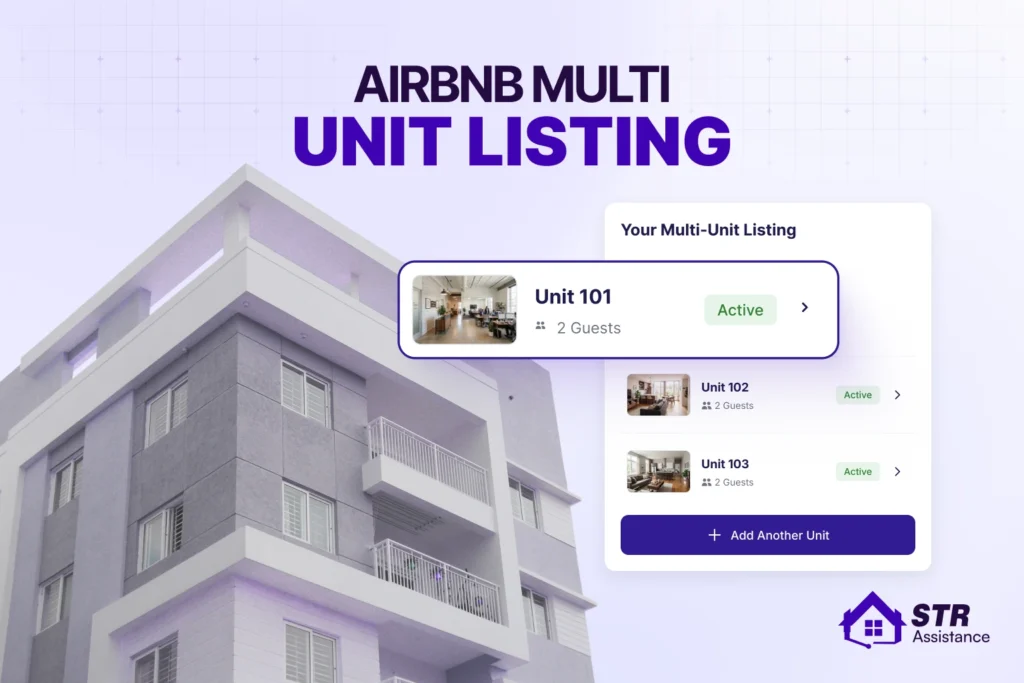
An Airbnb multi-unit listing is where a single main page represents multiple identical or very similar individual rooms or apartments at the same location.
The phrase “multi-unit listing” causes real confusion because it gets used for three different things at once. Sometimes it means Airbnb’s own grouping feature. Sometimes it just means a host who happens to run several separate listings. Sometimes it gets mixed up with running multiple host accounts entirely, which is a different setup with its own rules.
At STR Assistance, we manage listings for hosts running anywhere from two units to entire buildings. The question of whether to merge or keep listings separate comes up constantly, and the honest answer changes depending on the property, the market, and what the host actually wants their week to look like.
Today let’s talk about how Airbnb’s Multiple Units Property feature actually does, whether it’s even available for your property’s location, and whether merging your units or keeping them separate makes more sense for how you actually operate. None of that has a single right answer that applies to every host, which is exactly why it’s worth working through properly instead of guessing.
What "Multi-Unit Listing" Actually Means on Airbnb
A multi-unit listing is a single listing that represents several identical or near-identical units sitting at the same address. Instead of five separate listing pages for five nearly identical studios, guests see one property page with five units to choose from inside it.
Airbnb groups units this way automatically once it detects matching addresses. Also, it pulls the reviews, ratings, and reliability data from every unit into one shared picture. When the guest completes a reservation, the booking page shows that multiple identical units exist for guests chosen dates.
Guests see a multi-unit listing as a single, standard parent property. They view shared photos, a unified description, and total availability rather than individual sub-units.
One important point is this feature isn’t available everywhere. Airbnb currently runs two versions of it.
- The bed and breakfast version, built for room-style groupings, only works for listings in Brazil and Italy.
- The multiple apartments version only works in Japan and Spain.
If your property sits outside those four countries, you can’t use Airbnb’s native grouping tool right now.
Who this Feature is Designed for?
This feature is built for hosts with genuinely identical or near-identical units. It’s not built for a host with one entire house and one separate basement suite that look nothing alike.
This is how it works for hosts.
- Centralized Calendar: Hosts manage one master calendar and inventory count instead of separate pages for every single room.
- Automated Syncing: When one unit is booked for a specific date, availability updates automatically across the pool.
- Visibility Trade-Off: The property takes up only one search result slot instead of multiple pins on the map, but it benefits from higher booking momentum.
Airbnb Multiple Units vs. Separate Listings

Separate listings each get their own search result and their own map pin, while a Multiple Units Property shows guests one property with several units inside it. This drag to another note worthy comparison with multiple host accounts which means having distinct profiles to run separate portfolios, completely different from multiple units listings.
Here’s how they stack up against each other directly.
Feature | Multiple Units Property | Separate Listings |
Search Visibility | One listing, one map pin for the whole property | Each unit gets its own listing and its own map pin |
Guest Reviews | Combined across every unit in the property | Tracked individually per listing |
Guest Favorites | Based on ratings and reliability from every unit together | Evaluated separately for each listing |
Calendar Management | Managed centrally through one property editor | Each listing needs its own calendar, synced manually or through a PMS |
Pricing | Can still vary by unit, set through the listing editor | Fully independent per listing, no shared structure required |
Best For | Genuinely identical units, hosts prioritizing lower admin time | Units with real differences, hosts prioritizing maximum search exposure |
How Airbnb's Multiple Units Property Feature Works
Airbnb’s multiple units property feature groups separate apartments or rooms sharing the same address into a single listing. Guests can select specific individual sub-units based on live inventory. If you are interested into grouping your listings here are core features you must need to know.
Automatic Property Grouping
Airbnb groups units together the moment it detects matching addresses. You don’t build the grouping by hand from scratch. List a second unit at the same address as an existing listing, and Airbnb offers to fold it into a property with the first one.
Adding an existing listing to a property works the same way. You update its address to match the others, and Airbnb pulls it in. This can take up to two weeks to actually show up on the guest-facing side.
Property Editor vs. Listing Editor
These two tools do different jobs, and mixing them up is the most common confusion new multi-unit hosts run into.
- The property editor handles everything at the whole-property level: the property’s title, its overall photos, its description, and a custom web address if you want one.
- The listing editor handles everything specific to one unit inside that property: unit amenities, unit rules, trip length settings, maximum guest count, and that unit’s own description and photos.
You can also set a cancellation policy for multi-unit listings at both levels. One for the property overall and a separate one for an individual unit if you need that flexibility on your host calendar.
How Guest Favorites Works
For a Multiple Units Property, the Guest Favorites badge looks at ratings, reviews, and reliability data pulled from every unit in the combined property. Guests get a single, complete picture of the whole property’s track record.
A property full of strong units earns the badge faster because the combined data looks great. A property with even one consistently weak unit can miss the badge entirely, even if the other four units are performing beautifully on their own.
Regional Availability
This is the detail that decides whether anything else in this section applies to you. Bed and breakfast style grouping is currently limited to listings in Brazil and Italy. Multiple apartments style grouping is currently limited to Japan and Spain.
If your property sits anywhere else, the property editor and listing editor tools described above simply won’t be available to you yet.
How to Remove a Unit from Airbnb's Multiple Units Property?
You’re not locked in once a unit adds to a property. Removing a unit doesn’t delete its listing, it simply becomes a separate listing again, with its own page and its own place in search results.
You can do this through the property editor, where you can remove any unit at any time. Just know when you remove the listing, it starts competing in search the way any independent listing does. Would it be better or worsts, depending on how strong its individual review history already is.
Review Preservation and Parent Listing Selection
Here’s something most on this topic skip entirely. When you’re building a property out of listings that already exist separately, which one becomes the parent listing matters more than it sounds like it should.
Choose your highest-reviewed, longest-standing unit as the one the others get grouped into, not your newest one. Multi unit listing around an established listing carries its review count, its ranking history, and any Superhost momentum.
Inventory Assignment Logic
Guests booking a Multiple Units Property don’t pick a specific physical unit the way they’d pick a specific listing. They book the property for their dates, and Airbnb assigns them one of the available units from the pool.
This matters operationally in a way that’s easy to miss. If unit 3 has a broken air conditioner and unit 4 doesn’t, you need your own system, not Airbnb’s. Keep problem units out of rotation until they’re fixed. It also means a single bad guest experience in one unit can get a review that impact the whole property, since guests don’t always distinguish which specific unit they stayed.
Should You Use Airbnb's Multiple Units Property?
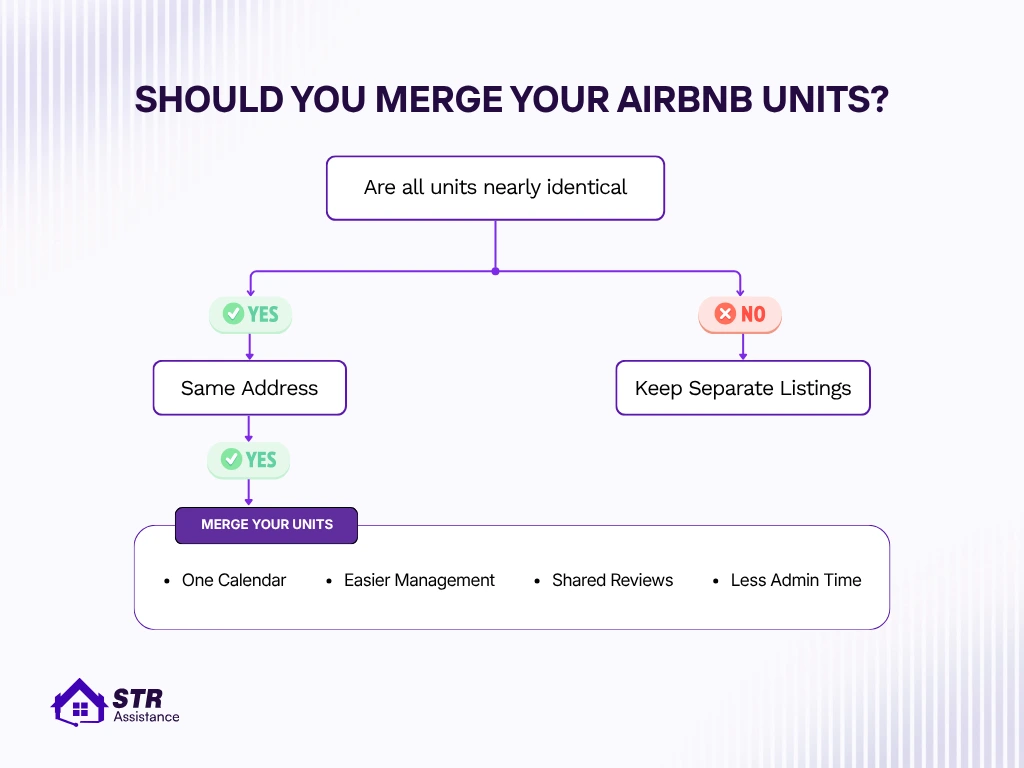
The decision comes down to how similar your units genuinely are and what you’re optimizing for. Here’s the honest breakdown.
Use It If
- Your units are nearly identical in layout, finish, and overall guest experience, not just similar on paper.
- All units share one address, which is a hard requirement, not a preference.
- Operational simplicity is genuinely your priority over squeezing out every last bit of search exposure.
- You want one calendar, one description to maintain, and easier day-to-day management across the board.
Avoid It If
- Your units target different guest types, since a family suite and a solo traveler studio don’t belong on the same property page.
- Units have genuinely unique layouts, views, or features that would get flattened into one generic description.
- Maximum search visibility matters more to you than reduced admin time, since separate listings simply get seen by more searches.
- Every listing already has different pricing and positioning that reflects real differences guests should know about upfront.
The Real Trade-off: Merge Your Units or Keep Them Separate
Merge your units if you want simpler management, less admin, and a shared review history. Keep your units separate if you want maximum search visibility, flexible pricing, and independent reviews.
Here we have highlighted the benefits of multi-unit listings and solo listings, which will help you make a proper decision.
Benefits of Merging Units
- One calendar instead of several, which removes an entire category of double-booking risk.
- One description and one set of photos to keep updated, instead of maintaining five nearly identical pages that drift out of sync over time.
- A combined review history that can push a Multiple Units Property into Guest Favorites faster than any single new unit could earn it alone.
- Less time spent on repetitive admin, which is the single biggest complaint hosts running several units bring up first.
Benefits of Separate Listings
- More search results, more map pins, and more chances for a guest to actually find your property in the first place.
- Pricing and positioning that can differ meaningfully between units without one dragging down how the others read to guests.
- Full control over each unit’s own review trajectory, so one weak stay doesn’t touch the reputation of units that had nothing to do with it.
Search visibility is one of the biggest factor to consider when you are deciding for a multi-unit listing or a separate one. It fully depends on Airbnb SEO how conversion rate and click-through work. So, be careful on your listing ranks when making a decision.
A Simple Decision Framework
One question cuts through most of the back and forth here:
Are you losing more time to repetitive admin than you’re gaining in extra search exposure?
If the honest answer is yes, merging almost always wins. If you’re spending more than 10 hours a week managing 4 or more similar units, merging them wil save you more time than you lose in search visibility. If you’re spending less time than that, keeping your listings separate may be the better choice for greater visibility.
A host we work with had six identical studios in one building, each listed separately, and was spending most weekday mornings just making sure all six calendars still matched. Nothing was actually wrong, it was just slow. We helped consolidate them into a multi-unit listing built around the studio with the strongest review history. Booking management time dropped by more than half within the first month, and the combined review count pushed the property into Guest Favorites faster.
Local Regulations for Multi-Unit Buildings
Airbnb’s multi-unit feature and your city’s short-term rental rules are two completely separate systems, and mixing them up in your head can be an expensive mistake. Airbnb will happily let you multi-unit listings that your city doesn’t actually allow you to rent short-term at all.
Building-Level Short-Term Rental Restrictions
Plenty of cities cap how many units in one building can legally operate as short-term rentals, and the caps get specific fast.
Many cities require you to check the zoning and building code before listing a unit in a multi-unit building. Building documents like leases, condo bylaws, or HOA rules may ban or limit short stays even if the city allows them.
Common multi-unit restrictions
- Owner-occupancy rules
- Consent requirements
- Annual night caps
- Prohibited-building lists
- Tax registration
Two real examples of two different cities:
- In Jersey City, short-term rentals are largely restricted to buildings with fewer than four units, and even inside a qualifying building, only up to two of those units can be rented short-term. Rent-controlled units are prohibited entirely, no matter what else applies.
- Chicago runs a different but equally strict system. Under the city’s Shared Housing Ordinance, building owners can place their entire building on a Prohibited Buildings list, and once a building is on that list, no unit inside it can register for short-term rental at all. More than 2,300 buildings currently sit on that list. For buildings that aren’t prohibited, Chicago caps registered units at whichever is smaller, six units or 25% of the building’s total unit count.
Why Regulations Are Separate From Airbnb's Feature
Three completely different rule sets govern a multi-unit property, and they don’t match to each other. Airbnb’s own platform rules decide whether you can group listings and how Guest Favorites gets calculated. Local government regulations decide whether you’re legally allowed to run short-term rentals in that building at all. HOA and condo board policies can restrict or ban short-term rentals entirely, independent of what the city allows.
Chicago’s density cap is a clean example of why this separation matters. A host could have five units at one address, all identical, all eligible for Airbnb’s grouping feature if they were in one of the four countries where it’s live. None of that changes whether Chicago’s ordinance actually permits five units in that specific building to register for short-term rental. Airbnb tell you what’s possible on the platform. Your city tells you what’s legal.
How to Check Your Building's Rules
The rules and regulations differs from city to country. To know your city-specific building rules check these points.
- Your city’s licensing office, which usually maintains the actual registration requirements and any prohibited buildings lists.
- County regulations, since some restrictions apply at the county level rather than the city level, especially outside major metro cores.
- Your HOA, if the property sits inside one, since HOA rules can be stricter than anything the city requires.
- Your condo association, for the same reason, condo boards frequently restrict short-term rentals beyond what local law demands.
How to Manage Multiple Airbnb Units Efficiently
To manage your multiple Airbnb units try to automate guest communications, coordinate cleaning & turnover, proper review management across every units.
Here’s what actually keeps several units running smoothly at once.
Calendar & Availability Management
Double bookings are the single most avoidable problem in multi-unit hosting, and they almost always trace back to a calendar that wasn’t actually synced. Airbnb treats double booking cancellations as host error, so the fee tiers and calendar blocks still apply. Keep every calendar connected, whether that’s Airbnb’s own calendar linking for listings under the same host, or a property management system if you’re also listing on Vrbo or Booking.com. If you’d rather not rely on slow iCal links, the right software can sync calendars across multiple listings and platforms in real time.
Airbnb might treat your units as one grouped pool, while Vrbo or Booking.com still shows each unit as fully separate. A PMS has to keep one inventory synced across different platforms. If it isn’t managed properly, availability mistakes can happen.
Pricing Multiple Units
Pricing multiple units works differently than pricing one listing on its own. Set price based on overall occupancy, not individual units.
When most of your units are empty, rates should drop to fill them. As occupancy climbs, rates should rise. Dynamic pricing tools handle this kind of occupancy-tiered logic far better than manual adjustments across five or six separate calendars ever could. Seasonal pricing and length-of-stay discounts still apply on top of that occupancy logic.
Our dynamic pricing service helps hosts to set logical pricing based on seasons, trends, locations and so on.
Brand new building with zero reviews across every unit struggles to compete against established listings nearby, even at a fair price. Our dynamic pricing service helps hosts to set logical pricing based on seasons, trends, locations and so on.
Guest Communication Across Multiple Units
Message consistency across several units matters more than it sounds like it should. Automated messaging templates keep tone and information consistent across every unit without forcing you to type the same check-in instructions five separate times.
Response time still matters just as much at scale as it does for a single listing. Since a slow reply on unit 3 reflects on the whole property’s reputation if you’ve grouped your listings. Our guest communication team handles exactly this kind of consistency with response time under 5minutres for hosts who don’t want to be the one typing every reply personally.
Cleaning & Turnover Coordination
Scheduling cleaners across multiple units gets complicated once you’re dealing with same-day turnovers on more than one unit at once. A cleaner finishing unit 2 late because unit 1 ran over doesn’t just delay one guest, it can cascade into every turnover scheduled after it that day.
Maintenance coordination needs the same kind of centralized tracking. A recurring issue in one unit, a leaky faucet, a slow Wi-Fi router, is easy to lose track of when you’re mentally juggling five units instead of one.
So, you have to be very active as well as your cleaner team for the turnover coordination, so the guests find a cleaned place every time they check-in. However, if it is a real hassle for you our cleaning coordination service is built specifically around this same-day, multi-unit turnover problem.
Keeping Reviews Strong Across Every Unit
Multiple Units Property’s Guest Favorites status reflects every unit’s performance combined, not just your best one. One consistently underperforming unit does real damage here. It doesn’t just hurt its own bookings.
Check each unit review regularly and response properly. Catching a weak performer early is easier than waiting for it to affect your overall ratings. Our review management service helps hosts stay ahead of this instead of finding out after the badge is already gone.
Naming and Branding for Grouped and Separate Units
Clear, consistent naming keeps guests, cleaners, and maintenance staff from mixing up which unit is which, and it matters whether you’ve grouped your listings or kept them separate.
“Riverfront Suites, Studio 1” and “Riverfront Suites, Studio 2” tell everyone exactly what they’re looking at. “Cozy Downtown Apartment” repeated five times with no differentiation tells nobody anything. The same logic applies if you add your own site, where multi-property rental website design should group units clearly so guests can compare them at a glance.
How STR Assistance Helps Manage Multi-Unit Properties
We Help Manage Your Multi-Unit Properties
Running one Airbnb listing well is a part-time job. Running five or six units well, with calendars that never collide, and reviews that stay strong across every single unit, is closer to running a small hospitality business. Most hosts don’t sign up for that second job on purpose, it just grows into it one extra unit at a time, and at STR Assistance we help hosts reduce their stress.
For hosts who want ongoing, hands-on support across every unit, our dedicated Airbnb VA covers the daily operational load directly. And if you’d rather keep more control while still offloading the parts that eat your time, our co-host can help manage the day-to-day tasks.
You keep the strategic decisions. We handle the daily execution and entire listing management, so none of it falls on you at 11pm when a guest can’t find the door code.
If you’re not sure yet whether your units should be merged, kept separate, or handled some other way entirely, reach out and we’ll look at your actual property with you.
Conclusion
A multi-unit listing helps you lower admin time and a combined review history that can reach Guest Favorites faster. If you have the same type of listings, then it’s better to merge them, and all you need to do is set the address the same, and the rest is Airbnb’s automatic system.
Before changing anything, check whether the native grouping feature is even available where your property sits, check your building’s specific caps and permit rules, and run the honest math on how many hours a week your current setup is actually costing you.
FAQs
Not directly through manual selection. Guests see the property as a whole first, then browse available units based on their dates and Airbnb's own matching logic, not a fixed order you control unit by unit.
Reviews stay attached to the property as a whole, not to individual units within it. A unit you split back out as a standalone listing starts fresh without the combined review history, even though the property it came from keeps its own reviews intact.
No. Standard host service fees apply the same way whether your units are grouped into one property or listed separately. Grouping is a management and visibility choice, not a pricing structure change on Airbnb's end.
The feature is built around genuinely identical or near-identical units, so mixing private rooms with entire homes under one grouped property works against the whole point of it. Keep meaningfully different unit types as separate listings instead.
Guest Favorites for a Multiple Units Property looks at combined ratings and reliability across every unit, so one consistently weak unit can keep the whole property from qualifying. Superhost status works differently, since it's evaluated at the host account level across all your listings, not per property.
Usually yes, and this depends entirely on your city, not on Airbnb. Many cities require individual registration per unit, and some cap how many units in a single building can register at all, regardless of how you've structured your Airbnb listings.
Yes, as long as you're in one of the eligible countries. Update the address on the listings you want to add so they match your existing property, and Airbnb will fold them in, though it can take up to two weeks to fully appear on the guest-facing side.
No, and this is the detail most other guides on this topic miss entirely. The bed and breakfast version only works in Brazil and Italy. The multiple apartments version only works in Japan and Spain. Everywhere else, hosts need separate listings synced manually or through a property management system.