- Key Takeaways
- An Airbnb listing audit covers five core areas: property presentation, search visibility, listing accuracy, booking settings, and conversion performance.
- The review includes 11 areas, from listing titles, photos, and amenities to pricing, calendar settings, reviews, and guest communication.
- Common listing issues include incomplete information, weak photos, missing amenities, pricing gaps, booking restrictions, and repeated guest complaints.
- Airbnb search performance is influenced by listing quality, popularity, price, and location.
- Listing audits can reveal performance gaps, but cannot identify exactly why an individual guest did not book or guarantee future revenue.
- An audit report provides a scored overview of listing performance, identified issues, and prioritised improvement opportunities.
- Audit every 3 months, with a quick performance check every 1 to 2 weeks in between.
An Airbnb listing audit is a step-by-step, scoring-based review process that helps hosts understand how their listings are performing in search results, the ranking position, how interactively and completely the listings are presented to guests, and booking percentage. After years of experience in listing management, we have found ojt 5 core areas of listing audit: property presentation and first impressions, search ranking factors, listing information completeness, booking barriers and restrictions, and Conversion Rate Optimization (CRO), but there are tons of other factors also involved.
A listing audit can be conducted through a manual Excel spreadsheet, using AI, or using specific listing audit tools. Whatever the method is, three core areas should be considered when conducting an Airbnb listing audit:
- The Search Card (First Impressions): Photo (Hero Shot), title, total price transparency, and reviews & rating.
- The Listing Page (The Gallery & Details): Photo sequence, accurate amenities, description & rules.
- Calendar & Booking Mechanics: Open availability, minimum stay & settings, and listing issues tab.
STR Assistance’s listing optimization experts consider two additional areas to make the audit more impactful: Guest Communication and Response Performance, Host Reliability, and Superhost Benchmarks.
After the audit is done, the report helps create a prioritized action plan with supporting evidence.
A 2026 Homesberg study of more than 2,000 active listings found that the bottom 25% had booking conversion rates below 0.14%, compared with a typical rate of 0.36%. This makes listing audits more important.
Today, let’s take you a round of an Airbnb listing audit: what criteria hosts should check, a basic understanding about the scoring system, what problems hosts can find through the audit, and does the audit needs professional help or if hosts can do it themselves.
What an Airbnb Listing Audit Includes
An Airbnb listing audit is a structure review of Airbnb listing performance covering the titles, descriptions, photos, with calendar, pricing, and guest reviews that are extracted the listing specific data. According to Airbnb article 39, Airbnb search results are influenced by quality, popularity, price, and location.
Plenty of hosts come to us after fixing the visible stuff, new photos and a fresh title, but the issue can be something else, and only a listing audit can reveal that. It can be a booking rule that is keeping the potential guest away from booking. A complaint that showed up twice.
Our listing management team usually take 24 hours to 48 hours to audit a listing, that also depends on the number of the listing. Also, if the audit needs rewritten content and optimization recommendations, then it can take 3 to 5 business days.
Other professionals or if you use some tools, then the timing can vary. So, it is better to ask how much time a listing audit can take.
What Problems Can an Audit Find?
A listing audit can immediately tell you the accuracy of your listing information, how strongly all the informations are presentable in the listing that is visible to the guests, any amenities that you missed, and an overall listing performance review.
- Inaccurate or incomplete information: Wrong bed counts, unclear sleeping arrangements, missing amenity details, old photos.
- Weak presentation: A low-quality generic cover photo, dark or repeated images, a confusing photo order, a generic title.
- Missed search filters: Amenities you offer but never selected.
- Unclear booking rules: Long minimum stays, tight arrival days, a short availability window.
- Calendar and software conflicts: Blocked nights, expired requests, sync errors, software’s own rules.
- Funnel weaknesses: Low search exposure, low-ranking listing, weak click-through, visits only, no reservations. Airbnb’s professional tools show first-page impressions and conversion.
- Revenue and occupancy imbalances: Strong occupancy with weak nightly rates, long unbooked nights, too many blocked nights.
- Repeated guest problems: Repeat complaints about cleanliness, check-in, noise, missing equipment.
What Can an Audit Not Tell You?
A listing audit can not show for what specific reason a guest did not book; it does not provide guaranteed revenue, nor can it provide a report on competitors’ real earnings.
For legal compliance, a review can flag registration or restriction concerns only, but hosts themselves need to check local requirements and permissions.
Also, you can not have a detailed understanding of the space’s physical condition, like cleanliness, smells, mattress comfort, or safety systems, just from a photo.
Moreover, except for hosts, if the listing audit manager does not have host dashboard access or exported data, it is difficult to have a report on conversion, cancellations, blocked dates, and limited stay history.
The Airbnb Listing Audit Scorecard
A scorecard turns “my listing feels off” into six categories you can mark pass or fail. Every mark needs evidence behind it; otherwise, it’s an opinion.

- First Impression and Title: Headline clarity, a real selling point instead of a generic phrase, and a length that fits Airbnb’s limit of fewer than 50 characters.
- Photo Set and Gallery Order: Lighting, staging, cover photo strength, room coverage, captions, and sequence. Airbnb’s own professional photography program reports 19% more net bookings across 14,700+ listings from 2024 to 2025. That’s Airbnb’s figure, not a promise.
- Description and Copy: Readability, tone, accuracy about the layout, and how well it answers the questions guests really ask.
- Pricing and Revenue Strategy: Nightly rates, cleaning fees, length-of-stay discounts, and dynamic pricing against local competitors.
- Guest Communication and Reviews: Response speed, automated messages, check-in clarity, review themes, and what brings repeat guests back.
- Amenities and Facts Sync: Real amenities, sleeping arrangements, and property specs checked against your platform settings.
How to Audit Your Airbnb Listing: 11 Areas to Check
Airbnb said in its November 2023 Listings tab announcement that listings with more details can get up to 20% more bookings. And a listing audit does not only mean changing photos or descriptions; there are also more details than you can think.
So how do you audit your Airbnb listing to get more bookings? Open Insights and find the funnel stage that’s leaking. Audit the items tied to that stage. Fix them in order of cost, then measure again after 1 to 2 weeks.
Here, we have listed 11 main areas to check when doing the Airbnb listing audit.
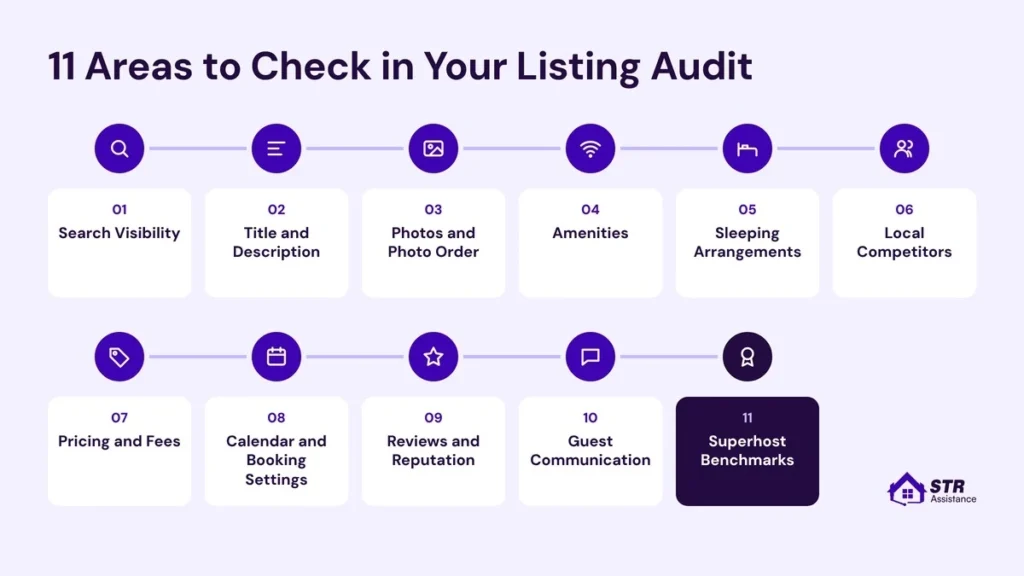
1. Listing Status and Search Visibility
We read the funnel backwards. Start at bookings → climb to views → finish at impressions →stop at the first stage that looks weak.
In Insights, open Conversion. Airbnb shows the journey in three stages:
- First-page search impressions
- Search-to-listing conversion
- Listing-to-booking conversion
Pull impressions, views, bookings, conversion, occupancy, nightly rate, and revenue. Compare them with your own earlier period and with similar local listings. Never with a different season or a different kind of property. Airbnb’s professional hosting tools also hold quality and hosting-progress data, and the history of 12 months.
Do the sums yourself.
- Click-through rate (CTR) = Views ÷ First-page search impressions × 100 (About 12% median; 19.5% median in one large sample; strong listings often 20%+).
- Listing-to-booking conversion = Bookings ÷ Views × 100 (About 1.6% median; 3.1%+ is top quartile).
- Overall booking conversion = Bookings ÷ First-page search impressions × 100 (About 0.36% median; 0.74%+ top quartile).
What you see | Where to look |
Low exposure | Availability, filter eligibility, pricing, booking restrictions. |
Views without bookings | Total price, photos, reviews, policies, unclear information. |
High occupancy but weak earnings | Rates, discounts, turnover costs, stay length. |
2. Title, First Impression and Description
Read the title and the first three lines as someone who has never seen the place. Ask one thing: can they say what it is, who it suits, and what sets it apart? If they can’t, that gets rewritten before anything else.
- Name the guest specifically: Families, couples, business travelers, groups or longer stays. A title can’t speak to all of them.
- Keep the title true and short: Airbnb’s title guidelines ask for fewer than 50 characters, the important information first, no emojis, and no repeated symbols. Longer titles get cut in search. Check our listing title examples.
- Split the description into three: Who it’s for, what they’ll love (three to five points that match your best photos), and what to know before booking.
- Say the numbers early: Bedrooms, bed types, and bathrooms near the top, plus two or three nearby places.
- The first three lines: Mobile guests see only those before “show more”. Put the question guests ask most there: Wi-Fi speed or distance to the main attraction, whichever it is.
3. Photos and Photo Order
The first five photos are most important. Ask whether each one gives a different reason to book. A bright hero shot, the main bedroom, the living area, the kitchen, and the single wow feature.
- The cover photo should show the strongest real selling point.
- Quality: brightness, sharpness, composition, outdated furnishings, duplicates, and wide-angle shots.
- Cover every guest-accessible room and outdoor area. Airbnb’s photo tour groups images by room, so use it.
- In captions, set expectations. “Queen bed, blackout curtains, street-facing, some city noise at night”.
- Airbnb counts saves to a wishlist as a popularity signal. A line in your description or pre-booking message like “if these dates are taken, tap the heart to save this place” gives interested guests a reason to come back.
4. Amenities and Property Features
The most important is checking the Airbnb amenities listed in the listing and the actual benefits hosts are providing. Airbnb actually penalizes hosts if the claims are not similar to the amenities.
Moreover, guests mostly search by features in the filters. If your listing has the amenities in the list, then the probability becomes higher that Airbnb shows the listing to the guest. So, give a thorough check of what amenities are available and what to add compared to the competitors, and lastly, whether all the amenities are mentioned.
The filters that matter most are,
- Wi-Fi
- Kitchen
- Parking
- Air conditioning
- Washer
- Pet permission
Explain conditions also.
- Paid parking.
- Shared laundry.
- A pool that closes in winter.
- Hot-tub hours.
- Stairs, shared spaces.
- Road noise.
- Liimited parking.
- Pets on site.
- Restricted areas.
5. Property Details, Sleeping Arrangements, and Guest Capacity
We call it bed math. Count the sleeping spots three times: in the listing’s bed settings, in the photos, and in the description. When they disagree, the guest finds out at check-in, standing in a bedroom with one bed fewer than the listing promised, and the accuracy rating pays for it.
Verify property type, room type, address, map location, guest capacity, bedrooms, beds and bathrooms. Check that check-in and check-out times match across the listing, the house rules, and your automated messages.
6. Local Competitors
We keep the same five competitors for the whole quarter. That way, a change in the gap comes from your listing, not from a different sample.
Open Airbnb in a private window and search with your real dates and group size. Then pick 3 to 5 listings that match your guests and not only your street. For each, note what the first five photos show, which amenities they highlight, how the title and first three lines read, and what the total price comes to. Then ask what they show that you don’t. This way, you can find the obvious gap before a guest does the same comparison side by side.
7. Pricing and Fees
You have to set the pricing that includes the nightly rates and other fees, because Airbnb no longer shows a separate total to a guest, and guests get to see the total amount you charge.
Review weekday, weekend, seasonal, holiday, and event pricing. Check cleaning, pet, and extra-guest charges. Look at weekly, monthly, last-minute, and early-booking discounts for cuts you never meant to make.
- Base nightly rate: Compare to 5–10 similar nearby listings for the same dates, guest count, and property type.
- Weekend/peak pricing: Check Friday–Saturday, holidays, local events, and high-demand seasons.
- Low-demand pricing: Check weekday, off-season, and last-minute dates.
- Minimum stay: Check 1-, 2-, and 3-night settings by day of week and season.
- Cleaning fee: Compare with similar listings and test its effect on total price for 1-, 2-, and 3-night stays.
- Extra-guest fee: Check whether it is set above the included guest count and whether it is justified.
- Pet fee: Confirm whether pets are allowed and whether the fee covers actual cleaning risk.
- Discounts: Review weekly, monthly, early-bird, and last-minute discounts.
- Guest total: Preview the full checkout price, including all host fees, Airbnb fees, and taxes.
In Airbnb, go to Calendar → select dates → Price per night (or Smart Pricing) → Guest total to preview the guest’s checkout price and the host’s estimated earnings. Airbnb also lets hosts add cleaning, extra-guest, and pet fees.
8. Calendar and Booking Settings
We never loosen the minimum stay for a whole year. First, we find the one-to-three-night gaps, then set the rule for those dates alone.
Calendar and booking audit checklist:
- Review minimum and maximum stay requirements.
- Check arrival and departure restrictions.
- Review advance notice and preparation time settings.
- Look 60 to 90 days ahead for large blocked periods.
- Identify single blocked days that break up bookable periods.
- Check whether more open dates and flexible stay lengths could improve visibility.
- Test four booking scenarios as a guest: weekend, midweek, last-minute arrival, and longer stay.
- Record which booking scenarios fail and why.
- Consider Instant Book if it suits your hosting preferences.
- Review whether strict minimum-stay rules are excluding potential bookings, especially during slower months.
- Avoid host-initiated cancellations unless absolutely necessary.
A few things to remember:
– A five-night minimum excludes guests searching for one-to-four-night stays.
– Stricter booking rules protect turnover time but can also reduce booking opportunities.
– Host cancellations can lead to penalties ranging from 10% to 50% of the reservation amount, with a $50 minimum, depending on timing. They may also result in blocked calendar dates or loss of Superhost status.
9. Reviews, Cleanliness, and Host Reputation
In the listing audit, the guests’ reviews and host reputation should both be reviewed and fixed immediately.
Read your last 20 to 30 stays and tag every complaint: cleanliness, noise, not as described, check-in, Wi-Fi, beds, parking.
Reviews to audit
Area | What to check | Red flag |
Overall rating | Current average rating and rating trend over the last 6–12 months | Rating is below 4.7, declining, or lower than nearby competitors |
Review volume | Number of reviews and whether new reviews arrive regularly | Few recent reviews, which weakens buyer confidence |
Category ratings | Cleanliness, accuracy, check-in, communication, location, and value | Any category below the overall rating |
Negative-review themes | Group recent 1–3 star reviews by issue: cleanliness, noise, bugs, Wi-Fi, check-in, photos, beds, amenities | The same complaint appears repeatedly |
Host responses | Check whether the host replies professionally to negative reviews | Defensive, argumentative, or missing responses |
Review recency | Confirm whether recent reviews reflect the current condition of the property | Old 5-star reviews hide a recent decline in quality |
Guest expectations | Compare review wording with the listing description and photos | Guests repeatedly say “not as pictured,” “smaller than expected,” or “missing amenities” |
Cleanliness audit
- Recent guest feedback
- Turnover process
- Linens and towels
- High-touch areas
- Supplies
- Photographic proof
- Issue-response process
Host reputation audit
- Response rate and response time: Respond to 90% of new messages and reservation requests within 24 hours; Superhost standard.
- Acceptance rate: Airbnb does not publish a required acceptance-rate percentage; decline requests within 24 hours to protect response rate.
- Cancellations: Keep host cancellation rate below 1% for Superhost eligibility, excluding certain valid exceptions.
- Profile completeness: Superhost requires the host to be the listing owner with an account in good standing.
- Overall rating: Maintain an overall rating of 4.8 or higher for Superhost eligibility.
- Minimum review history: At least 10 reservations, or 3 reservations totaling at least 100 nights, for Superhost eligibility.
- Refund and issue handling.
- Cross-listing consistency.
- Policy clarity.
- Professional tone.
10. Guest Communication and Response Performance
We time the first useful answer, not the first reply. “Thanks, checking!” doesn’t count.
Read your last three message threads end to end, as the guest would, and work out how long it took before anyone told them something they could act on.
Airbnb’s host guidance says to respond to requests within 24 hours, and a slow host looks risky to a guest who has options. Then check the automated messages. Do any promise something the listing doesn’t offer? Is the check-in message clear enough to follow at 11 pm with a dead phone battery? Hosts in Airbnb’s Community forum say test the door code before every arrival, and add a plain line like “pull the door toward you before entering the code.”
If replying fast is what breaks your week, our Airbnb guest communication services take that off you. They answer on your behalf, inside your own account.
11. Host Reliability and Superhost Benchmarks
We watch the Superhost numbers as an early-warning panel, even for hosts who don’t care about the badge. They’re the only reliability numbers Airbnb publishes.
Use Airbnb’s Superhost requirements as benchmarks, not as a full audit score:
- An overall rating of 4.8 or higher.
- A response to at least 90% of new messages.
- A host cancellation rate below 1%, with qualifying exceptions.
- At least 10 reservations, or 3 reservations totaling at least 100 nights.
Airbnb assesses these 4 times a year, in January, April, July and October, each time looking back over the previous 365 days. Superhost status belongs to the host account. It isn’t a certificate that each property passed a listing audit.
How to Audit Your Airbnb Listing With AI
ChatGPT and Claude can run a solid first pass on a listing. Which AI you pick matters less than what you make it check. If you want a deeper, hands-on audit, use a general AI model. It only works as well as the data you feed it, so use real numbers.
Step 1: Gather your data. Export or copy your last 90 days of performance numbers (impressions, click-through rate, conversion rate), the titles and descriptions of your top 5 competitor listings, and your recent guest reviews, especially any that mention confusion, noise or missing items. Leave guest names out.
Step 2: Use a strong prompt. Paste this, then add your data underneath.
You are auditing my Airbnb listing for conversion. I’ll paste my title and description, my last 90 days of performance numbers (impressions, click-through rate, conversion rate), the titles and descriptions of five competing listings, and my recent guest reviews.
1) Tell me which funnel stage looks weakest and why.
2) Compare my title and first three lines with the competitors and name what they say that I don’t.
3) Find any amenity, noise, or access issue in the reviews that my description leaves out.
4) List the problems in order of impact and mark each one as confirmed by the data or a guess.
Don’t invent numbers. If something can’t be judged from what I pasted, say so.
Don’t depend on any of them completely. They read text and photos. They can’t stand in your hallway, feel the mattress, or see your Insights unless you paste the numbers in.
Use Dedicated AI Audit Tools
Dedicated tools such as AuditBnB, NowIStay, Book With Haven, and the PriceLabs Listing Optimizer do the audit from a pasted link.
Paste your public listing link and get a graded breakdown in minutes. Here’s what each tool says it does.
- AuditBnB: Grades nine areas, from photos and title to reviews and competition, in about 90 seconds, according to its own site.
- NowIStay: Reads your listing from the guest’s side and offers alternative titles, a rewritten description, and a photo check.
- Book With Haven: Scores photos, copy, pricing, and discoverability, then ranks the fixes.
- PriceLabs Listing Optimizer: scans titles, photos, descriptions, amenities and reviews against local competitors.
Those descriptions come from the tools themselves. We haven’t ranked them, and a public link gives them no access to your Insights. Compare their output with your own funnel numbers before you act on it. Our guide to Airbnb tools for hosts goes wider.
How to Score Your Audit and Prioritise Fixes
You can create your scoreboard with all 11 areas we have talked about. Here is a number system you can use that would make the scoring system easier to do.
Build a Scorecard for Each Area: Use one marking system everywhere. Mix scales and your total means nothing.
Mark | Meaning |
2 (Pass) | Checked against evidence and meets the stated criteria. |
1 (Needs improvement) | Partly correct or working, but one specific weakness remains. |
0 (Fail) | A confirmed error, broken process, or unmet requirement. |
U (Unverified) | Not enough information. Don’t assume a pass or a fail. |
N/A (Not applicable) | Not relevant to this property at all. |
For every mark, write down five things. A screenshot, calendar test, guest feedback, photograph, document, or calculation. Then the issue in specific words. Then the action, the owner with a deadline, and how you’ll verify the fix.
The total is a completion score: Points earned ÷ (2 × verified applicable areas) × 100.
Take 14 points across eight verified areas. That’s 87.5%. Report unverified and not-applicable areas separately, so two unverified areas stay visible instead of hiding inside a good number.
Sort Issues by Priority
Three tiers, in this order. Priority 1 is anything that could harm a guest, block entry or mislead someone. Priority 2 is what costs you bookings: cover photo, title, total price and booking rules. Priority 3 is polish, like extra captions and a fuller host bio. Inside each tier, rank by five questions.
- Severity: could this harm a guest, prevent entry or materially mislead someone?
- Exposure: does it hit the next arrival, every booking or one odd guest?
- Evidence: is it a confirmed failure, a repeated complaint or an untested hypothesis?
- Financial impact: does it block reservations, create refunds, add cost or shrink margin?
- Effort and dependency: can it be fixed now, or does another task come first?
How Often to Audit Your Airbnb Listing
Unless your listing has shown any performance metrics or a bad score, a monthly Airbnb listing audit is enough. But hosts should do a review quarterly or seasonally, like after every 3 months. Airbnb sets no fixed audit deadline for new listings.
- Monthly (5–10 minutes)
- Seasonally (every 3 months)
- After major edits or property updates
- When metrics drop
We add an extra audit whenever one of five things happens: a launch, a drop in bookings or occupancy, repeated negative feedback, a season change, or a new property.
- When You Launch a New Listing: Before publishing a new listing, do a review for factual errors and booking restrictions. Within 24 to 48 hours of going live, check the listing again. After the first 3 stays, compare the guests’ feedback with what you have promised in your listing.
- When Bookings or Occupancy Drop: When you see the booking rate drop, or the occupancy rate, do not wait for another week. However, keep in mind the season, demand, holidays, and other factors. Maybe this is a slow month why your booking is low, and in such a case you do not need to review anything.
- After Repeated Negative Feedback: Two similar complaints? Or repeated complaints from the guests? Now make this your top priority, check the complaints and compare whether the complaints are valid or not, and fix the issue immediately. Before that, reassure the guests with a reply, so Airbnb sees you as a responsible host.
- Before Seasonal and Market Changes: If there is a big event, holidays, or seasons, then instead of updating the pricing and other features, do it at least 2 weeks before. So, later you can recheck everything; also, the algorithm gets time to notice your updates.
- When You Add More Properties: Conduct a separate audit for Airbnb multi-unit listings. Settings copied from another property carry that property’s mistakes over. For the first month, check each new property weekly for calendar conflicts, wrong messages, and operational gaps.
When the Audit Says Your Listing Needs a Refresh
After the audit, it’s time to refresh things based on the report.
Instead of panicking, start with urgent fixes and policy-driven items first.
- House rules & checkout instructions: Review your house rules if these were set before November 20th. Check the checkout process; are they clearly stated or not?
- Required account or address actions: Check for any Action required notices or address updates in your host dashboard. Then fix those.
- Broken or unavailable amenities: Remove or update any amenities that are out of order. Message guests with upcoming reservations immediately if an expected amenity changes.
- Fix your top three review issues.
Next, refresh the photos and the description details.
- Update visuals and room flow: Replace outdated or unclear photos, and arrange images in a logical room-by-room order. Write clear captions that set accurate expectations.
- Align copy with photos: Be very specific and use plain language to write the descriptions using bullets so the guests can easily know about the space and know what to expect.
Lastly, check conversion & calendar.
- Audit reviews: Look for recurring complaints in recent stays. Message past happy guests and ask them to tap the heart and save the place.
- Check calendar: Calendar rules (like minimum stays or blocked dates) against similar listings.
- Pricing: Check your total price against similar listings. Try to use dynamic pricing, not generic.
After the refresh, wait 1 or 2 weeks. If it still does not work, then go to a professional or try to figure out why your Airbnb bookings have slowed. Also, make a checklist of to-dos when listings search visibility becomes low.
Download the Airbnb Listing Audit Checklist
We turned this guide into a one-tab spreadsheet. It lists all 11 areas, takes the 2, 1, 0, U, and N/A marks, and has columns for evidence, issue, action, owner, deadline, and verification. The completion score works itself out as you fill it in.
Download the Airbnb Listing
Audit Checklist
Should You Audit Your Listing Yourself or Hire a Professional?
The decision of hiring an audit manager for your Airbnb listing depends on the number of your properties listed, how underformed these listings are, do you have plenty of time and the expertise to do it yourself or not.
A host with 10 years of experience and few property management responsibilities on their hands can do the audit by themselves. In such cases, they may have a co-host to handle other things, so a listing audit is not a big deal.
But those who have less time or experience, and even after an audit can not figure out which is the root issue, should go for professional help/
Here we have prepared a 6-question table for you. Answer them honestly, and the result will give you an idea of what to do.
Ask yourself | Yes points to | No points to |
Can you open Insights and name the weak funnel stage without guessing? | Doing it yourself | Hiring a professional |
Do you have 1 to 2 weeks between changes to wait and measure, and a free day every quarter? | Doing it yourself | Hiring a professional |
Does someone other than you read the listing before it goes live? | Doing it yourself | Hiring a professional |
Can you test your own booking rules and total price as a guest would? | Doing it yourself | Hiring a professional |
Do you manage one or two listings? | Doing it yourself | Hiring a professional |
Can you check what photos can’t show, like smells, mattresses, and door codes? | Doing it yourself | Hiring a professional with local help |
How Can STR Assistance Help You Audit Your Airbnb Listing?
We have a dedicated team for host listing management, and auditing is part of the process. We give top priority to listing audits because only this way can we know the actual performance of a listing.
We get hosts complaining about some common pain points for their listing when we do a vigorous audit of the listing.
- Low search impressions compared to similar listings.
- Fewer listing views than expected.
- Low booking conversion rate despite getting views.
- Declining occupancy rate.
- High cancellation rates.
- Poor guest reviews or declining ratings.
- Repeated guest complaints about cleanliness, amenities, or property descriptions.
- Low repeat bookings.
Though a listing audit does not need daily or weekly checks, for some areas we do a daily assessment, and here is a table.
How often | What we audit |
Daily | Calendar, blocked dates, prices, sync errors. |
Weekly | Our fixed set of competitors, new reviews, response times. |
Monthly | Impressions, click-through, conversion, occupancy and nightly rate; whether the title, photos or description need a change. |
Every 3 months | Full 11-area audit with scores, a ranked fix list, owners and dates. |
Every 6 months | Photos and amenities against the property, seasonal rates and minimum stays, competitor set refresh. |
Yearly | Overall positioning, fees and discounts, platform mix, and whether the listing needs a rebuild. |
If you need help with your listing management, reach out to us; we have a dedicated Airbnb virtual assistant or an entire team if you want, and the auditing process will automatically be added to the process.
Airbnb Listing Audit FAQs
Open Insights and read your impressions, views, and bookings. Then search your area in a private window and compare your first five photos, title, and total price with three to five similar listings. Mark each of the 11 areas in a checklist with the evidence beside it. It costs nothing but time, and you need no tool.
Compare your conversion with your own earlier weeks and with similar local listings. Low impressions mean visibility is the problem. Plenty of views with no bookings point to price, photos, reviews, or booking rules.
The audit itself changes nothing. The fixes do. Airbnb ranks on quality, popularity, price, and location, so fixes that lift photo quality, ratings, total price, and open dates can help. No audit can promise a position in search.
Airbnb hasn't published a rule that edits lower your ranking. Hostaway quotes an Airbnb video saying that changes with no real quality improvement bring no algorithm benefit. Edit to fix something real, change one thing at a time, and note the date.
No. A new listing starts your reviews and booking history again, and the guests who trusted you don't carry over. Rebuild the existing listing: title, photos, description, amenities, and settings. Relist only when the property has changed so much that the old listing describes a different home.
Several tools take a public listing link, including AuditBnB, NowIStay, Book With Haven, and the PriceLabs Listing Optimizer. Check which parts are free and which sit behind a signup. None of them sees your Insights or your property, and the Insights tab in your host account is free.
Audit each listing on its own. Copied titles, photos, and settings carry one property's mistakes to the others. A shared checklist and a shared schedule keep the work fast without blurring the details.
Yes, if the VA is trained in short-term rentals and has co-host access to your listing. A good Airbnb virtual assistant runs the checklist, tests your booking rules, and builds the fix list. Decisions on price floors, house rules, and guest promises stay with you.
Anything that can stop a guest from getting in, cause a double booking, or mislead someone goes first. Next comes whatever costs you bookings: cover photo, title, total price, and booking rules. Polish goes last. An easy photo swap shouldn't jump ahead of a safety repair, and the lowest score is not always your biggest loss. The full ranking method sits in the scoring section.
Conclusion
An audit is only worth doing if it ends in a ranked list and a date to measure again. Start with the first five photos. Test the booking rules. Compare the total price. Then work through the other eight areas, mark each one with evidence, and fix by harm.
Do it every 3 months and check the numbers every 1 to 2 weeks. A listing that’s looked at on a schedule doesn’t need a rescue.