Quick Answer
Airbnb has no rules for late check-out approvals, and only the host has the control to accept or deny it. Airbnb’s default check-out is 11:00 AM if the listing sets no time. Hosts can charge a fee for it for the early check-in or late check-out approval. But only if that fee is in the listing description before booking and gets collected through the Resolution Center. If a guest stays past check-out without approval, Airbnb’s terms let the host make them leave. There are penalties for the guests too.
Late check-out means when guests want to leave after the listing’s check-out time, with the host’s approval. If the host does not approve it, then it counts as an overstay. Hosts can charge for the late check-out as an optional add-on. The rules are simple: Airbnb’s disclosure condition needs to be met, and the fee is visible before the guest books. But Airbnb has no such specific rule for late check-out approval; they let the host decide.
Check-out times are often overlooked. But I’ve watched it decide an entire turnover. I’m Nujhat, and across the 800+ properties my team and I support, the check-out hour sets when the cleaner starts and whether the next guest walks into a ready home. Our approach is simple. When there’s no same-day arrival, we offer late check-out as a paid extra.
Today I will be sharing how you can also make your late check-out approvals into rental income and build a good relationship with your guests. You will get to know what Airbnb allows, how guests should ask, what hosts can charge and how to collect it, and what to do when a guest simply doesn’t leave. You’ll find copy-ready message templates also.
Does Airbnb Allow Late Check-Out?
Yes, Airbnb allows late check-out, but only when the host agrees to it. Airbnb has no platform-wide rule. Every host decides based on the next booking and the cleaner’s schedule.
A guest can ask for a late check-out for any reason and send a request message through the Airbnb messaging app to the host. The host has the choice to say yes or no and reply in the text message. This way everything stays written, and there is no space for any conflict later.
When a listing sets no time, Airbnb falls back on the standard Airbnb check-out time of 11:00 AM local time, according to Airbnb’s Request a late checkout time.
I’ve noticed that most check-out disputes start with a yes given on a phone call or at the door. So we push every host to move that conversation into the thread.
Late Check-Out vs Overstay

The confusion between late check-out and overstay is common, as some guests can misuse the terms. But as a host, you have to be very clear on the concept.
A late check-out is agreed upon in advance and planned around. But an overstay is neither. One is a service, the other is a problem. It can actually impact how you charge, how you get paid, and what happens to the next booking.
Factor | Late check-out | Overstay |
Host approval | Yes, agreed in advance | No |
Fee basis | Optional add-on disclosed in listing | Reasonable overstay penalty under Airbnb’s Terms |
How it’s paid | Resolution Center request | Resolution Center claim, Airbnb mediation if disputed |
Risk to next booking | Planned around | Can delay cleaning and next check-in |
Effect on reviews | Usually positive | Often noted in host review |
How Can a Guest Ask for a Late Check-Out on Airbnb
A guest has the right to ask for a late check-out through the Airbnb messaging platform, as we already said. But guests need to maintain some unwritten rules to avoid any conflict, as the space can be booked for the next guest based on the last check-out time. As a host, you should always reply faster to a specific, polite request than to a vague one.
- The guest should ask as early as possible if a late departure is important.
- Before booking: Contact the host if the guest needs a late check-out.
- At least one day before check-out.
- Should avoid asking on the morning of check-out: This is a last resort because the cleaner’s schedule is usually already set.
- Follow Airbnb’s guidance: Message the host with planned departure time.
Options to Offer If You Cannot Approve a Late Check-Out
In this situation, you may not be able to approve a late check-out request; instead, there are three alternatives you can offer that are feasible for you.
- Offer luggage storage: If possible, allow guests to leave their luggage temporarily after check-out. If you cannot store it, recommend a nearby luggage storage service.
- Suggest extending the reservation: If the guest needs to stay until the evening, offer the option to book an additional night, subject to availability.
- Help them plan their departure: If neither option is possible, politely remind guests of the standard check-out time. You can send a follow-up message to let them know what to do with their luggage and keys.
Can Airbnb Hosts Charge a Late Check-Out Fee?
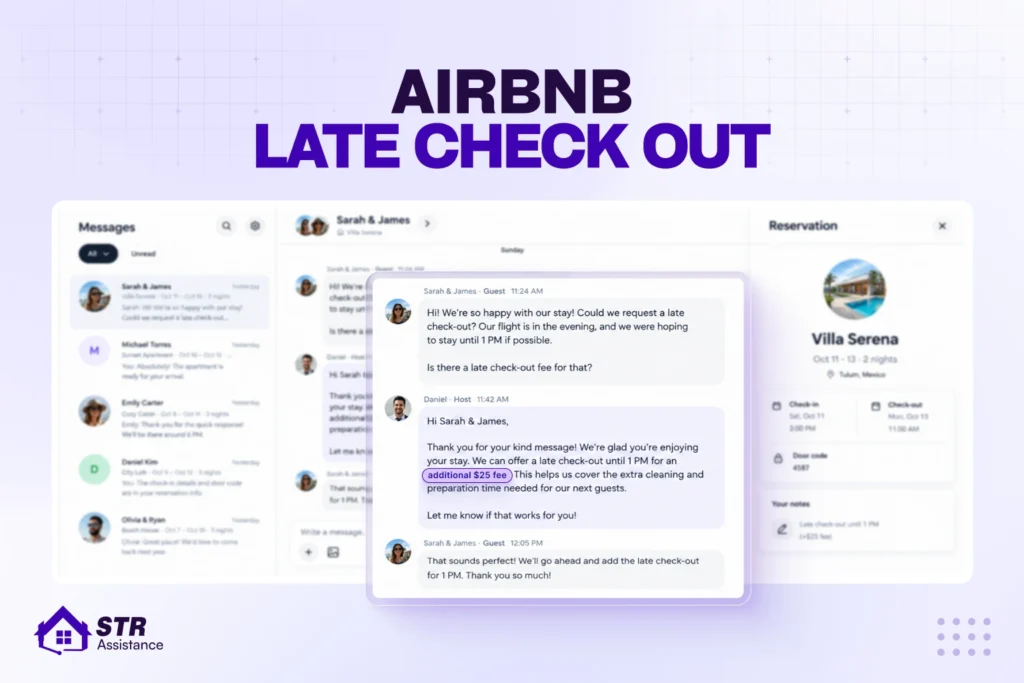
Yes, according to the Airbnb Help Center, hosts can charge for late check-out as an optional add-on. But the fee has to be mentioned in the listing description before booking.
We help hosts set the late check-out fee the same way we do the early check-in fee. Because you cannot reveal a surprise cost when the guest requests it. If any host does so, Airbnb can take action against the host.
An important point every host should remember is that payment goes through the Resolution Center. Airbnb says payments for optional extras should be sent on Airbnb using the Resolution Center. You cannot take cash, and any payment apps are out. A guest can report a host who asks for them. An agreed late check-out fee and an overstay penalty are also different things with different rules. The first is a deal made in advance. The second is a consequence.
Write the fee into your listing description in plain words. A line like “Late check-out is available on request for a fee; ask us by 6:00 PM the day before” does the job and takes five seconds to add.
How Much to Charge for Late Check-Out
A host can charge $25 to $50 for late check-out, approximately based on the hour, or go for customized charges based on specific criteria. You can charge little or nothing for a short extension if you want to have a good relationship with the guest and it costs you nothing extra.
Your number depends on how late the guest wants to stay, how long your property takes to clean, your nightly rate, and the season. The amounts below are my rough guesses. So test them against your own calendar.
How late | Common approach | Why |
Up to 1 hour | Free, or a small fee of about $10 to $15 | Little impact on the cleaner |
1 to 3 hours | Paid fee, roughly $25 to $50 | Cleaner route has to change |
After 3 hours or evening | Sell the extra night | Same-day check-in is blocked anyway |
If I share my personal experience with hosts, we waive the fee for long stays, repeat guests, or when the next night is vacant and nothing is lost. It also helps to glance at your Airbnb dynamic pricing. On a night when demand is high, an extra hour costs you more than on a quiet Tuesday.
How to Collect a Late Check-Out Fee
Request the money in the Resolution Center at the moment you approve. Do not request after the guest has left. Confirm the time and the amount in the Airbnb thread first. Then follow the steps from Airbnb’s request money guide:
- Open Today and select the reservation, then choose Send or Request money.
- Click Request money, select the reservation, and click Choose.
- Under What is this request for? Pick the reason that fits best.
- Enter the agreed amount and add a short note saying it’s for late checkout.
- Click Next, then Request. The guest can pay, propose a different amount, or decline.
For an evening departure, skip the fee and add a night instead. That change goes through the reservation itself. Airbnb says the Resolution Center can’t collect payment for reservation changes.
When Hosts Should Approve Late Check-Out
Approve it when nobody checks in that day; the cleaner has room, and you can still reset the property before the next guest. I’ve handled this with plenty of our host clients, and these are the real-life situations where a late check-out is feasible. Three checks decide it:
- Look for a same-day arrival first and manage your Airbnb calendar accordingly.
- Check the cleaner’s start time and how long the property takes to clean. A studio and a four-bedroom house can take different amounts of time to get cleaned properly.
- Think about stay length. After one night a 1 PM exit won’t cost much. But after two weeks, the property needs a longer reset.
Here are the situations where I’d say yes and where I wouldn’t:
- Next night vacant: approve it, free or paid.
- Same-day arrival with a gap in the cleaner’s day. You can offer a partial yes, like noon instead of 2 PM.
- Long-stay or repeat guest. Waive the fee and enjoy the goodwill.
- Tight same-day turnover. Decline politely and offer another option.
Working Out the Latest Safe Check-Out Time
Your latest safe check-out is the next check-in time, minus your average clean time, minus an inspection buffer. For example, a two-and-a-half-hour clean plus a 30-minute buffer before a 3:00 PM check-in puts the cutoff at noon.
Property size | Average clean time | Latest check-out before a 3 PM check-in |
Studio or 1 bed | [Add STR cleaning average] | [Calculated] |
2 to 3 beds | [Add STR cleaning average] | [Calculated] |
4+ beds or villa | [Add STR cleaning average] | [Calculated] |
Coordinating Late Check-Out With Your Cleaning Team
Tell your cleaner the night before, and move the unit to the end of the cleaning route. If a guest leaves late without notice, cleaners often charge waiting time. And hosts need to pay the charges. It is better to share your Airbnb calendar with your cleaner so they can know what is coming next.
Next, update the check-out time in the Airbnb reservation. Do not forget to check the smart lock settings. The guest’s existing code may not adjust automatically. Make sure the code works until the new check-out time, with a suitable expiry buffer.
You can follow the same process for early check-in by adjusting the access time accordingly.
Offering Late Check-Out as Extra Income
Late check-out becomes income when you offer it before the guest asks, on stays with no same-day arrival, and on a vacant next night. I like to put the offer in the night-before message, right beside the check-out instructions, because guests are planning their last morning then.
Our Airbnb check-out instructions template has a spot for it. When the next night is empty, I’d rather sell a discounted extra night than haggle over hours.
But I understand the real hassle of offering the guest the fees, and before that you need to scan the calendar for openings, request the fee through the Resolution Center, and brief the cleaner. What is workable in such a situation of having a virtual assistant for Airbnb who can do all of these for you and get you a good income.
Late Check-Out Message Templates for Hosts
Here are six templates for the moments that come up most. Each is short enough to paste and move on, and you can find more in our Airbnb message templates collection.
Proactive offer in the night-before message:
“Hi [Name], check-out tomorrow is 11:00 AM. If you’d like a little longer, I can offer 1:00 PM for $[amount]. Just reply here and I’ll send the request through Airbnb.”
Approving a free late check-out:
“Good news, [Name]. Nobody’s arriving after you, so a 1:00 PM check-out is fine, no charge. Please leave the keys inside and lock up behind you.”
Approving a paid late check-out:
“Happy to help, [Name]. A 2:00 PM check-out is $[amount]. I’m sending the request through Airbnb now, and you’re all set once it’s paid.”
Partial approval (earlier time than requested):
“I can’t do 3:00 PM because our cleaner starts at 1:00, but 12:30 works. Does that help?”
Declining because of a same-day arrival:
“Sorry, [Name], a guest checks in this afternoon, so I need the home by 11:00 AM. If your bags need somewhere to go, a luggage storage service nearby can help.”
Offering a discounted extra night:
“Since nobody’s booked tomorrow, you’re welcome to stay another night for $[amount], below our usual rate. Want me to send the change request?”
Check out more Airbnb message templates.
Setting Your Late Check-Out Policy on Airbnb
Set your standard check-out time in listing settings, then write the late check-out rules into your house rules and listing description. This is the part that saves you from negotiating with every guest. Our Airbnb house rules template can start you off, and good Airbnb listing management keeps the wording consistent across every listing.
Use this checklist to build your own:
- Set a clear check-out time: if you don’t, Airbnb’s default is 11:00 AM local time.
- Check the next booking first: late check-out is easiest with no same-day turnover.
- Define “late”: for example, free until noon, paid until 2:00 PM, not available after that.
- Charge only when justified: Airbnb itself names extra cleaner costs as a reason.
- Disclose the fee before approval: amount, cutoff time, and payment through the Resolution Center.
- Update the reservation, not just the message: it keeps the record and any smart lock accurate.
- Be careful with smart locks: the existing code may not update for the new time.
- Require check-out tasks: dishes, trash, linens, and keys done by the approved time.
- Don’t allow belongings to stay without approval: Airbnb’s ground rules ask guests to get prior host approval.
- Use quick replies: Airbnb’s host resources suggest one for accepting late check-out requests.
- Decline politely when it won’t work: cleaning, the next arrival or your own availability are fair reasons.
- Consider a buffer between bookings: block a night between stays if you often run same-day turnovers.
- Remember trip changes reset exceptions: Airbnb says the adjusted time returns to your listing default if dates change.
What Happens if a Guest Checks Out Late Without Permission
According to Airbnb’s terms, the host can make the guest leave. Also, impose reasonable overstay penalties. Stay calm and put everything in writing. This will be strong proof and will help you get paid.
What Airbnb's Terms of Service Say
Section 1.3 of Airbnb’s Terms gives hosts the right to make an overstaying guest leave. The exact quote it says is:
“If you stay past checkout, the Host has the right to make you leave in a manner permitted by applicable law, including by imposing reasonable overstay penalties.”
So, as a host, you can:
- Ask the guest to leave right after the approved check-out time.
- Request payment for the extra time through the Resolution Center.
- Impose a reasonable overstay penalty. It should comply with local law.
- Take lawful steps to regain possession if the guest refuses to leave.
You may see a “2x nightly rate” online. The current Terms don’t contain it and say only “reasonable.” Check local law before charging any multiple.
Steps When a Guest Hasn't Left at Check-Out Time
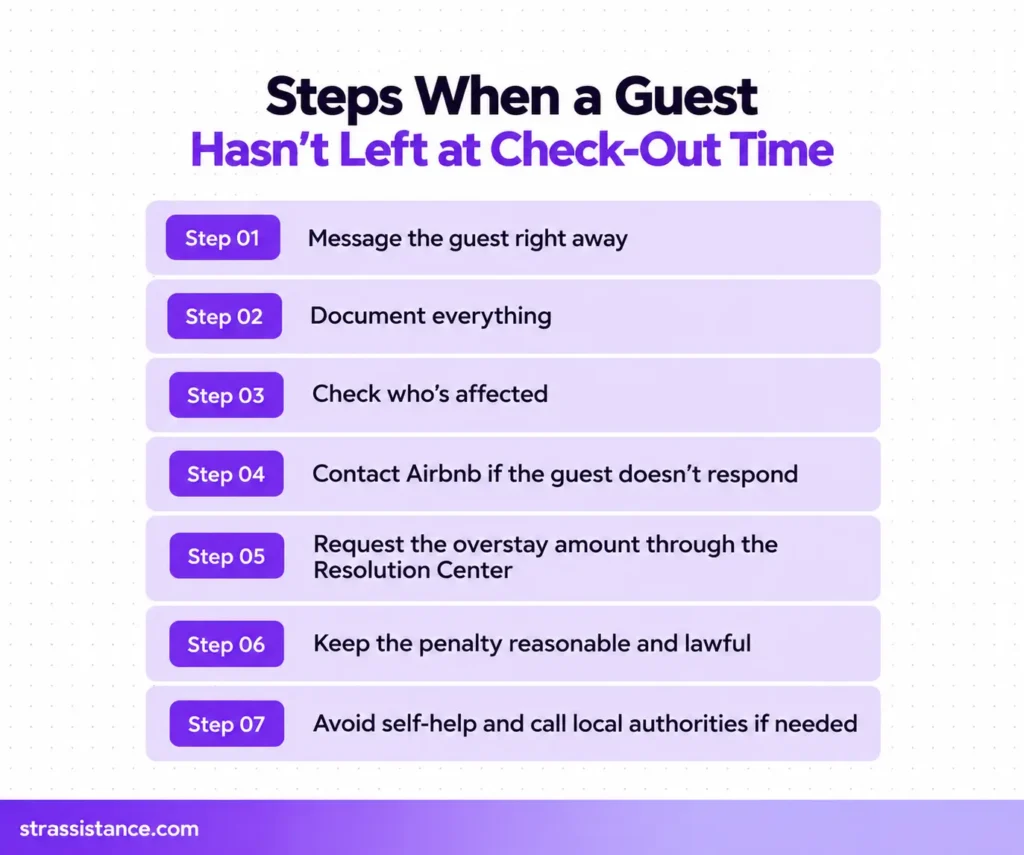
If a guest refuses to leave, first message the guest in the Airbnb thread straight away. Give them a reminder about the check-out time and keep every timestamp. To deal with this type of difficult guest, go through these steps to protect yourself.
- Document everything. Messages, timestamps, photos, and any sign of impact on the next booking.
- Check who’s affected. The next guest or the cleaner may need a heads-up.
- Contact Airbnb if the guest doesn’t respond.
- Request the overstay amount through the Resolution Center, not in cash or through another app.
- Keep the penalty reasonable and lawful. Check the local tenant, eviction, and consumer-protection laws, which may limit what you can do.
- Avoid self-help. Do not attempt to change locks, remove belongings, or physically remove the guest.
- Call local authorities if there’s an imminent safety or property risk. Then report it to Airbnb.
Claiming Overstay Costs Through the Resolution Center
Request the money in the Resolution Center with proof for every cost, and submit it within 60 days after the reservation ends. Document the cleaner’s waiting time and any compensation you paid the next guest for a delayed check-in and extra cleaning. The guest can pay or dispute the request, and if it’s disputed, you can ask Airbnb to review it. Our guides on Airbnb dispute management and how to charge an Airbnb guest for damage cover the same claim process.
Reviewing a Guest Who Overstayed
Try to write a review for the guest who overstayed with facts. States what happened without emotion. Mention the check-out time and when the guest left without your permission. Keep the tone calm. This will help future hosts to review such guests before booking confirmation.
How STR Assistance Handles Late Check-Out Across 800+ Properties
Most hosts ignore the golden opportunity of earning extra using late check-out approvals, but we don’t for our hosts. We did the same for check-in fees first, and one host claimed $800 at the month end from them. When I looked at the check-out side, I saw the gap that most hosts never see. The hours between a guest leaving and the next one arriving were quietly being given away for free.
We handle late check-outs with a night-before offer and documented overstays across 800+ properties.
I and my team actually built the strategy around it. The evening before, we check tomorrow’s calendar. If no one arrives that day, our Airbnb guest communication services team sends the late check-out offer, or a discounted extra night. Once the guest agrees, we send the Resolution Center request. Then reroute the cleaner to the end of the day through our Airbnb cleaning management process.
When a guest overstays, my team screenshots the thread, logs the times, records the cleaner’s waiting time and any delayed check-in, and files the request with proof. If you’d like that running on your listings, book a call with our team and see how our VAs handle late check-out requests.
Frequently Asked Questions About Airbnb Late Check-Out
Not always. Airbnb says hosts may charge extra, for example, when they need additional cleaners, so it's free only if the host chooses to make it free.
It depends on the host and the next booking. Hosts often allow an hour or two when nobody arrives that day, while a same-day check-in can leave little or no room.
Usually nothing dramatic if you message the host first. Without that message, it's still staying past check-out, which Airbnb's Terms let hosts penalize, so tell them early.
Yes, if you have the Airbnb app and push notifications turned on. According to Airbnb, you get a reminder the day before with your check-out time and instructions.
Yes, a short note saying you've left and locked up is a nice touch. It also gives the host a timestamp if the next turnover needs one.
It can. A host-approved late check-out rarely matters, but an unapproved overstay is often noted in the host's review of the guest.
Hosts can edit the check-out time on a single reservation, usually to give a guest a later time. Any change should be agreed in the Airbnb thread, so you both have it in writing.
Conclusion
Late check-out works when both sides play their part. Guests ask early and confirm in writing, and hosts check the next arrival and the cleaner before they say yes. Do those two things, and late check-out stays a favor you can price instead of a problem you chase. If you’d rather hand the calendar checks and guest messages to someone else, a short-term rental virtual assistant can run all of it for you.